What Should Your AI Remember—and When Should It Forget?

A customer contacts support for the third time. The AI asks for the order number again. An employee opens an internal assistant and has to explain the same project from scratch.

Deloitte predicted that 25% of enterprises using generative AI would deploy AI agents in 2025, rising to 50% by 2027. Accenture found that 48% of CxOs said their organisations lacked enough high-quality data to put generative AI into operation.

The answer is not to make AI remember everything. It is to build an AI memory architecture that decides what is worth keeping.

What Is AI Memory?

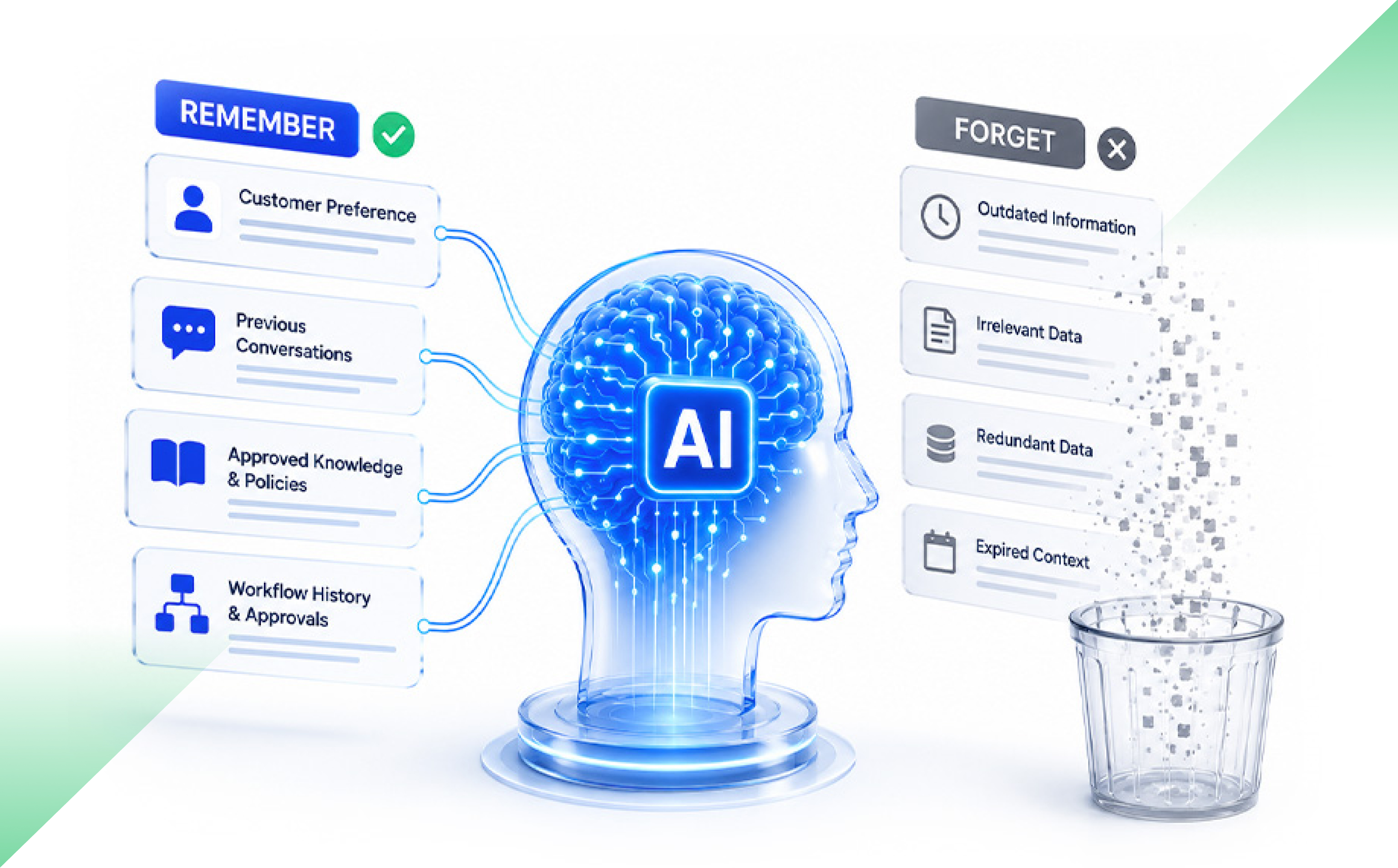
Microsoft describes a single ageAI memory is the information an AI system keeps and recalls across a task, conversation or longer period. It can include previous messages, user preferences, workflow history, corrections and approved organisational knowledge.

Useful memory improves context. Poorly governed memory can surface stale, incorrect or restricted information. It can also raise costs and slow responses.

AI Memory Is Not Just Another Database

Traditional software stores known facts: a customer ID, invoice status or workflow stage. These records have defined fields and owners.

AI memory may contain a conversation summary, a past correction or an inference made by the model. The AI uses that material to shape its next answer or action.

Microsoft warns that fragmented or poorly governed information can lead AI agents to produce misleading results and create security risks. Memory therefore needs clear sources, permissions, retention rules and owners.

What Types of AI Memory Does a Business Need?

A useful starting point is to separate memory into four types.

Session memory holds context for one conversation or task.

User memory stores confirmed preferences across sessions.

Workflow memory tracks approvals, completed steps, exceptions and unresolved issues.

Organisational memory provides authorised access to policies, procedures and approved business knowledge.

These memory types should not have the same lifespan. Amazon Bedrock, for example, lets teams set agent memory retention from 1 to 365 days. The correct period depends on why the information is being stored.

A support conversation may need memory for a few hours. A claims process may need workflow context for several months. A user preference may remain useful for longer, but only while it stays accurate.

Can Too Much AI Memory Reduce Accuracy?

Yes. More context does not always produce a better answer.

AWS guidance notes that growing memory can increase retrieval costs, consume more context tokens and add delay. Each extra item may need to be searched, ranked and passed to the model. Uncontrolled memory growth can also create compounding costs because retained context may be processed during later requests.

Quality can fall too.

The “Lost in the Middle” study by researchers from Stanford University, UC Berkeley and Samaya AI found that language models often performed best when relevant information appeared near the beginning or end of a long input. Performance dropped when the same information appeared in the middle.

Old memories create another problem. A preference changes. A policy is replaced. A user corrects an earlier statement. Yet the old version may still affect the next response.

That is context pollution: stored information reduces quality instead of improving it.

How Should a Company Decide What AI Remembers?

Every memory should pass five questions:

  • Purpose: Which future task will this improve?
  • Source: Did it come from a user, a verified system or an AI inference?
  • Duration: When should it expire?
  • Access: Who may retrieve it?
  • Correction: How can someone review, update or remove it?

Source matters. A preference confirmed by a user is not the same as an assumption drawn from one interaction.

Microsoft’s AI memory guidance recommends setting retention periods around compliance and user-data lifecycle needs. It also supports deleting memories for one user or removing an entire memory store.

If a company cannot explain why a memory exists, it probably should not keep it.

Why Should an AI System Forget?

Forgetting is not a failure. It is a product control.

An AI should remove information from active memory when:

  • A session ends
  • A workflow closes
  • The information expires
  • A newer version replaces it
  • The user corrects it
  • Permissions change
  • The original purpose no longer exists

This does not always mean deleting the source record.

A company may still need to retain an invoice, audit log or legal record. But the AI does not need to bring that record into every future interaction.

Record retention and AI recall are related. They are not the same thing.

How Do Permissions Apply to AI Memory?

An AI should not reveal information simply because it encountered it earlier.

Memory retrieval must check the user’s current identity, role and permissions each time. Microsoft 365 Copilot works within existing access controls and warns that overshared or poorly governed content can affect results and increase risk.

A person who moves teams should not keep access through an old memory. And an AI agent that can read a transaction should not automatically be allowed to change it.

Yesterday’s access is not permanent access.

How Do Permissions Apply to AI Memory?

A large memory store is not proof of a useful AI product. Measure the result.

Useful AI memory metrics include:

  • Reduction in repeated user input
  • Task-completion rate
  • Relevance of recalled context
  • Stale-memory incidents
  • User corrections
  • Access violations
  • Retrieval cost
  • Response delay
  • Percentage of memories with an owner and expiry rule

Microsoft also recommends tracking whether memory systems provide users with ways to view, edit and delete retained information.

The real question is simple: did the memory help the AI complete the task more accurately, safely and efficiently?

Better AI Does Not Mean Longer Memory

AI memory can make a product more useful over time. But unmanaged memory can make the same product slower, more expensive, and less trustworthy.

The goal is disciplined recall: the right context, for the right task, for the right user, for the right amount of time.

A well-designed AI should remember what still matters. And it should know when the past no longer belongs in the next decision.

Frequently Asked Questions

What is AI memory architecture?

AI memory architecture is the set of storage layers, rules and controls that decides what an AI remembers, where it is stored, who can access it and when it expires.

Should AI remember every conversation?

No. AI should retain only information that has a clear future purpose, a valid source and a suitable retention rule.

What is the difference between AI memory and chat history?

Chat history is a record of previous messages. AI memory is selected or summarised information that the system recalls and uses to influence future responses or actions.

One Agent or Ten? Choosing an AI-Native Architecture

Interest in AI agents is rising faster than production use.

McKinsey’s 2025 global survey found that 62% of organisations were experimenting with AI agents. Yet fewer than 10% were scaling agents within any individual business function. Capgemini found that 14% of organisations had implemented agents at partial or full scale, while 23% were running pilots.

The gap matters. Building an agent demo is one thing. Running it inside a live product, with real users, permissions, costs and failures, is another.

And that brings up an important architecture question.

Does the product need one capable agent, or does the work justify several specialised agents?

What is the difference between single-agent and multi-agent architecture?

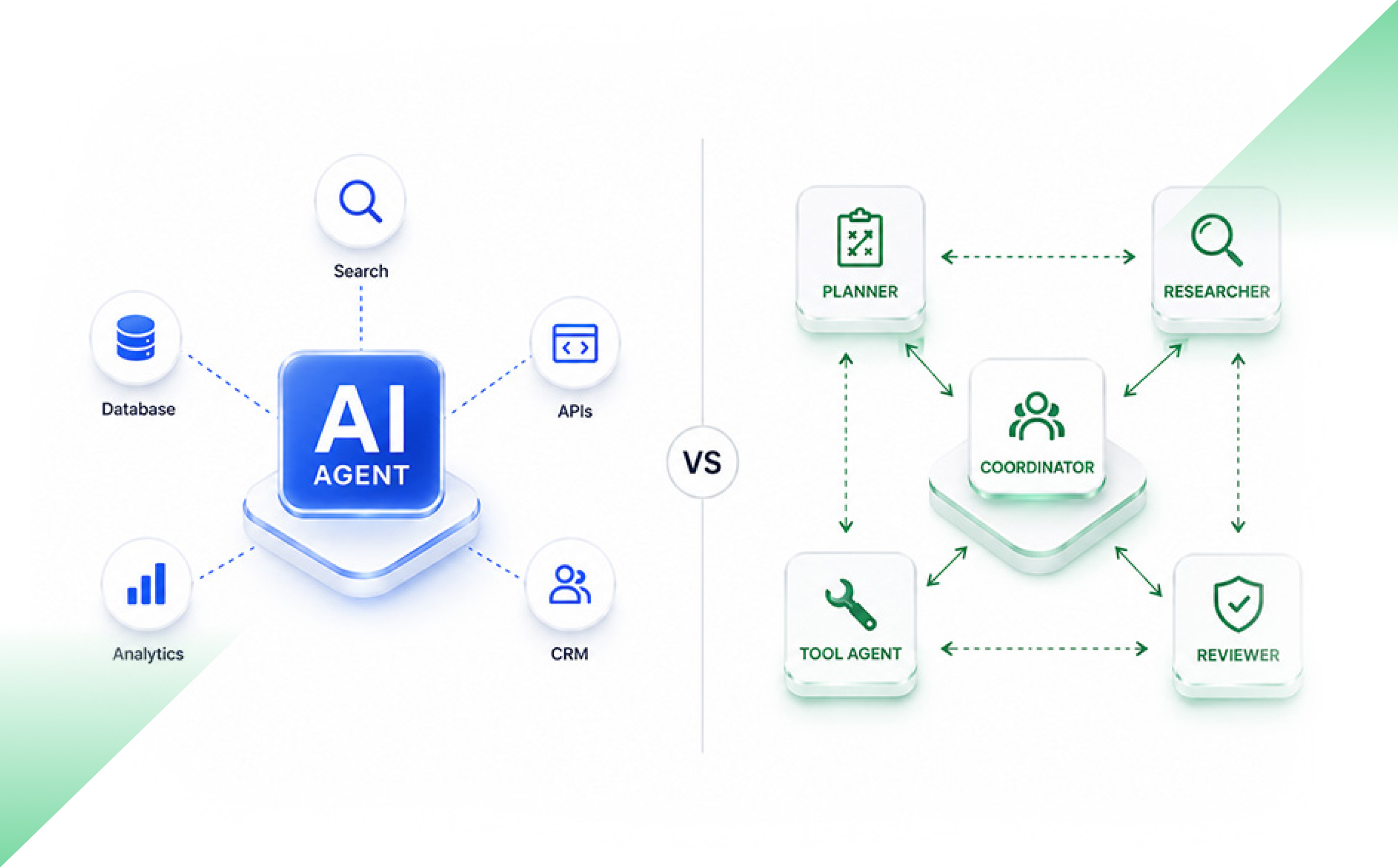
A single-agent architecture uses one AI agent to understand a task, choose tools, access information and produce an outcome.

A multi-agent architecture divides the work between two or more agents. Each agent may have its own role, instructions, tools, data access or decision rights. The agents may work one after another, operate in parallel or report to a coordinating agent.

Here is the practical difference:

FactorSingle-agent architectureMulti-agent architecture
Best suited forClear tasks within one domainComplex work across several domains
ContextMostly sharedSplit between agents
CostUsually lowerUsually higher
Response timeUsually fasterCan rise due to coordination
TestingEasier to traceRequires agent and workflow testing
PermissionsOne main access boundarySeparate access boundaries are possible
Failure analysisMore directMore handoffs and failure paths

Microsoft describes a single agent with tools as the usual starting point for enterprise use cases. Multi-agent systems become more suitable when work crosses domains, requires separate security boundaries or benefits from parallel effort.

Why do teams add agents too early?

A diagram with a planner agent, research agent, reviewer agent and execution agent can look well designed. It resembles a team with clear job titles.

But software agents do not work together like experienced colleagues.

Every handoff must carry the right context. The receiving agent must understand it. Two agents may repeat the same task, choose different sources or reach conflicting conclusions. A coordinator must then decide which answer to trust.

Specialisation can improve performance. But splitting a simple task into too many parts can make the system harder to control.

OpenAI recommends getting as much as possible from a single agent before introducing several. A single agent can often handle broad tasks by using clear instructions and well-defined tools. Multiple agents may be needed when instructions become difficult to manage or when the agent keeps selecting the wrong tools.

So, several steps do not automatically require several agents.

One agent can use many tools.

When is one agent enough?

Use a single agent when the task has one clear goal, stays within one business domain and depends on mostly shared context.

Consider a customer support assistant. It may need to:

  1. Identify the customer.
  2. Check an order.
  3. read the return policy.
  4. Create a service request.
  5. Draft a response.

These are separate actions, but one agent can manage them through controlled tool calls. Creating a different agent for each step may add more communication than value.

A single agent also makes testing simpler. The product team can inspect one decision path, one tool history and one set of instructions.

Before adding another agent, improve the current agent first. Tighten its instructions. Remove overlapping tools. Set clear stopping rules. Test it with real cases.

Sometimes the issue is not the number of agents. It is poor tool design.

When do multiple agents make sense?

Use multiple agents when the work can be divided into distinct areas that benefit from separation.

This may include situations where:

  • Several tasks can run at the same time.
  • Different domains need different instructions or knowledge.
  • Agents require separate permissions.
  • Independent review is necessary.
  • One failure should not stop the full process.
  • The task is too broad for one context window.

Research is a useful example. Anthropic reported that its multi-agent research system performed 90.2% better than a single-agent version in an internal evaluation designed around broad research tasks. Subagents searched separate areas at the same time, then passed their findings to a lead agent.

But this result needs context. It was an internal evaluation of a specific research system. It does not prove that several agents will improve every workflow.

Anthropic also reported that its agents used about four times more tokens than normal chat interactions. Its multi-agent system used about 15 times more. The company noted that this cost is suitable only when the task has enough value to justify it. It also found that work with heavy dependencies or shared context may not suit a multi-agent design.

That is the trade-off in plain terms. More compute can produce better results on the right problem. It can also produce a very expensive answer to a simple question.

What are the hidden costs of multiple AI agents?

Every new agent can add:

  • Another model call
  • Another context window
  • More tool calls
  • More logs
  • More retries
  • More permission rules
  • Another place where context can be lost

Failures can also travel through the system. If the first agent passes incorrect information, every later agent may build on the same error.

Microsoft warns that multi-agent orchestration adds coordination overhead, latency and new failure modes. Common problems include unnecessary agents, repeated handoffs, conversation loops, conflicting results and growing context costs.

The commercial risk is also becoming clearer. Gartner predicts that more than 40% of agentic AI projects will be cancelled by the end of 2027 because of rising costs, unclear business value or weak risk controls. This is a forecast, not a measured project failure rate, but it points to concerns enterprises are already facing.

Capgemini found that 71% of organisations did not fully trust autonomous agents for enterprise use. Only 46% had governance policies in place.

Adding agents without adding control is a poor bargain.

How should you choose the right AI agent architecture?

Ask five questions before creating another agent:

  1. Can one agent complete the task reliably?
    Test the simplest design first.
  2. Are the responsibilities truly different?
    Separate agents should have distinct goals, tools, knowledge or permissions.
  3. Can the work run in parallel?
    Parallel agents help only when tasks do not depend heavily on each other.
  4. Does separation reduce risk?
    A separate agent may help contain sensitive data, actions or failures.
  5. Can every handoff be traced?
    Teams must know what information moved, what changed and why the next agent acted.

The answer should come from testing, not from the architecture diagram.

Compare task completion, accuracy, response time, human review effort, failed handoffs and cost per successful outcome.

Control must grow with agent count

A production system needs clear ownership for every agent.

Define which tools each agent may use. Limit write access. Set retry and spending limits. Record handoffs. Add human approval before sensitive actions such as payments, refunds, publishing or account changes.

NIST’s Generative AI Profile recommends defining human and AI roles, documenting risks and managing governance throughout the AI lifecycle.

And test the whole workflow, not just each agent.

An agent may work well alone and still fail when another agent sends incomplete context.

The business outcome is the real unit of quality.

Choose the smallest architecture that works

One agent is not a basic choice. Ten agents are not automatically more intelligent.

Start with the smallest system that can complete the task reliably. Give it clear instructions, useful tools and firm controls. Measure where it fails.

Add another agent only when the new role improves speed, quality, security or failure control enough to justify the extra cost.

Complexity should earn its place.

Frequently Asked Questions

Is a multi-agent system better than a single agent?

Not always. A multi-agent system can help with parallel, cross-domain or permission-sensitive work. A single agent is often faster, cheaper and easier to test for contained workflows.

When should a company use multiple AI agents?

Use multiple agents when tasks need separate expertise, tools, permissions or context. They may also help when independent tasks can run at the same time.

What is the main disadvantage of multi-agent architecture?

The main disadvantage is coordination complexity. More agents create more handoffs, model calls, failure paths, monitoring needs and operating costs.

Can one AI agent use several tools?

Yes. One agent can search data, call APIs, update systems and complete several workflow steps. Multiple tools do not automatically require multiple agents.

AI Is Writing More Code. But Is Your Product Shipping Better?

AI coding tools are now part of everyday software development. Teams use them to generate functions, write tests, explain old code, fix errors, and create documentation. In many cases, they save time.

The problem starts when that saving is treated as proof that the whole delivery process has improved.

Code generation is only one stage of product delivery. A feature still has to be reviewed, tested, secured, integrated, released, and maintained. If AI speeds up coding but creates more work later, the gain may be much smaller than it first appears.

The better question is whether AI reduces the total effort needed to deliver a secure, stable, and maintainable product.

Does AI-assisted coding make developers faster?

Sometimes, yes.

A Microsoft Research and GitHub study asked 95 developers to build an HTTP server in JavaScript. Developers using GitHub Copilot completed the task 55.8% faster than those who worked without it.

But real product development is more complex. Developers work with old systems, unclear requirements, dependencies, and code written by several teams.

METR studied experienced open-source developers working on 246 real issues in repositories they already knew. In that setting, developers took 19% longer when using early-2025 AI tools, even though they believed they had worked faster.

The findings show that AI performs differently depending on the task and the environment. A tool may help with a clear exercise and still create friction inside a large codebase.

Why faster coding may not improve release speed

Writing code is only one part of the journey from an idea to a working product.

Once a developer finishes a task, the code moves through review, testing, security checks, integration, deployment, and production support. If AI increases coding speed, every stage that follows has to absorb more work.

The bottleneck may simply move.

Thoughtworks showed this through a delivery-cycle model. Even in an optimistic case, where coding represents 40% of the total cycle and AI improves supported coding work by 55%, the full cycle becomes only about 13% faster.

DORA reported a similar gap. Its research found that a 25% rise in AI adoption was linked with a 1.5% decline in delivery throughput and a 7.2% decline in delivery stability. One possible reason was larger code batches, which take longer to review and are harder to reverse.

This does not mean AI reduces performance in every team. It means coding speed should not replace release performance as the measure of success.

The hidden cost of review and rework

AI-generated code can look polished and still be wrong. It may miss an edge case, repeat existing logic, break an architectural rule, or fail to meet a security requirement.

Sonar’s 2026 survey of more than 1,100 developers found that 38% believed AI-generated code required more review effort than code written by a colleague. Only 48% said they always verified AI-assisted code before committing it.

A developer may save forty minutes with AI. But if a senior engineer spends an extra hour checking and correcting the code, the team has not saved time. It has shifted the work.

The 2025 Stack Overflow Developer Survey found that 66% of developers were frustrated by AI answers that were almost right, while 45% said debugging AI-generated code took more time.

Near-correct code creates confidence before it has earned it. A subtle logic error may pass a basic test and fail only under load, with unusual data, or after it interacts with another system.

Businesses should track review time, review rounds, requested changes, rework, and defects found after release. A feature completed two hours faster is not a gain if it creates two days of recovery work.

Working code is not always secure code

Veracode tested more than 150 large language models across 80 coding tasks. More than 95% of the generated code passed syntax checks, but only 55% passed security checks.

A separate study of 733 AI-generated code samples found in public GitHub projects identified security weaknesses in 29.5% of Python samples and 24.2% of JavaScript samples.

These studies do not represent every enterprise environment, but they point to the same conclusion: functional code is not always safe code.

Teams should track security findings, remediation time, repeat vulnerability types, risky dependencies, and issues found after release. Security checks should be built into development, not left until the end.

What happens after the code goes live?

Once code reaches production, someone has to understand it, modify it, test it, document it, and fix it. Weak structure, duplicate logic, or poor documentation may not cause an immediate problem, but they can make future changes slower.

GitClear analysed 211 million changed lines of code between 2020 and 2024. It found that refactoring fell while copied code increased.

The study does not prove that AI caused every change. But it highlights a risk: faster code creation can encourage teams to add new code instead of improving or reusing what is already there.

Useful measures include code churn, duplication, refactoring hours, test coverage, maintenance tickets, and the time needed to change a feature.

How should businesses calculate AI coding ROI?

A practical ROI model should start with the time saved during development, then subtract the added cost across the delivery process.

Net value of AI-assisted development = Development effort saved − Review, rework, defects, security, rollbacks, maintenance, tools, training, and governance costs

A stronger business metric is cost per stable feature released.

A stable feature is live, works as expected, passes quality and security checks, and does not need an urgent rollback or hotfix.

To calculate this properly, teams need a baseline from before wider AI adoption. They should identify which tasks involved AI and compare similar work over several sprints.

The comparison must be fair. A simple test script should not be measured against a complex payment workflow. Task size, risk, technology, developer experience, and codebase age all affect the result.

Most businesses already have much of this data across source control, project tools, test platforms, security scanners, and incident systems. The harder part is connecting it.

What should an AI development scorecard include?

A useful scorecard should cover development time, review effort, rework, defects, security findings, failed deployments, rollbacks, maintenance work, and total delivery time.

It should help leaders answer three questions:

Did AI reduce the time needed to complete the work?

Did quality and stability stay the same or improve?

Did the cost per stable feature fall?

These questions are more useful than accepted suggestions, commits, or lines of code.

AI coding tools can create real value, especially for clear and repeatable work such as boilerplate code, simple tests, scripts, documentation, and code explanation. More complex work needs stronger controls.

The aim is not to produce more code in less time. It is to deliver a secure, stable, and maintainable product with less total effort.

Frequently Asked Questions

Does AI coding improve software delivery?

It can improve some coding tasks, but review, testing, security, integration, and maintenance can reduce or remove the initial gain.

How should companies measure AI coding ROI?

Measure development effort saved, then subtract review, rework, defects, security fixes, incidents, maintenance, tools, training, and governance costs.

What is the best KPI for AI-assisted development?

Cost per stable feature released is a useful main KPI because it combines speed, quality, stability, and total engineering effort.

Which coding tasks benefit most from AI?

AI tends to work best for clear and repeatable tasks such as boilerplate code, simple tests, scripts, documentation, and code explanation.

What are the main risks of AI-generated code??

The main risks include additional review effort, subtle defects, security weaknesses, larger code changes, duplicate code, poor ownership, and higher maintenance costs.

Choosing Generative AI Solutions for Business Growth

Organisations across industries are increasingly adopting artificial intelligence to improve efficiency, enhance customer experiences, and unlock new business opportunities. However, with a growing number of tools and platforms available, selecting the right Generative AI solutions has become a strategic decision rather than simply a technology investment. The ideal solution should align with your organisation’s objectives, integrate seamlessly with existing systems, and deliver measurable value while maintaining security and compliance.

Right Generative AI Solutions for Sustainable Business Growth

The right Generative AI solutions should align with your organisation’s goals, support secure deployment, integrate with existing technology, and deliver measurable business outcomes. Evaluating scalability, governance, vendor expertise, and long-term return on investment helps organisations adopt AI confidently and create sustainable growth.

Start with Clear Business Objectives

Successful AI adoption begins with defining the problems you want to solve. Rather than investing in technology because it is trending, identify specific business challenges where AI can make a measurable difference. This may include improving customer support, accelerating content creation, automating repetitive tasks, or assisting employees with knowledge retrieval.

Clear objectives make it easier to evaluate potential solutions, establish performance benchmarks, and measure long-term success. Organisations that connect AI initiatives directly to business outcomes are far more likely to achieve lasting value.

Prioritise Scalability and Integration

As organisations grow, AI solutions should grow alongside them. A platform that performs well today must also support increasing workloads, users, and evolving operational needs.

Equally important is integration. AI tools should connect smoothly with existing enterprise systems such as CRM platforms, ERP software, document management systems, and cloud environments. Seamless integration reduces operational disruption, improves adoption, and allows teams to realise value more quickly.

Focus on Security, Compliance and Governance

AI systems often process sensitive business information, making governance a critical consideration. Organisations should ensure that data remains protected through robust security controls, encryption, user access management, and regulatory compliance.

Responsible AI practices are equally important. Businesses should look for transparency in model outputs, clear governance frameworks, audit capabilities, and mechanisms to minimise bias. These measures help organisations build trust with employees, customers, and stakeholders while reducing operational risk.

Evaluate Vendor Expertise and Support

Selecting a technology partner is just as important as selecting the platform itself. Experienced providers understand industry-specific requirements and can guide organisations through implementation, integration, employee training, and continuous optimisation.

When assessing vendors, review their case studies, technical expertise, customer support capabilities, and long-term product roadmap. A collaborative partner can significantly reduce deployment challenges while helping maximise return on investment.

Assess Business Value Beyond Automation

Although automation remains a significant benefit, organisations should consider the broader strategic impact of AI. Modern Enterprise generative AI platforms support faster decision-making, knowledge management, personalised customer experiences, product innovation, and workforce productivity.

Evaluating AI solely on labour savings may overlook opportunities for revenue growth, competitive differentiation, and improved customer satisfaction. A comprehensive business case should include both operational efficiencies and strategic advantages.

Prepare Your Workforce for AI Adoption

Technology alone does not guarantee success. Employees need appropriate training, clear governance policies, and confidence in using AI responsibly.

Organisations that encourage collaboration between business teams, IT leaders, and AI specialists typically achieve stronger adoption rates. Establishing clear guidelines for AI usage also helps maintain quality, accountability, and compliance across departments.

Measure Performance and Continuously Optimise

AI implementation is not a one-time project. Organisations should regularly monitor key performance indicators such as productivity improvements, customer satisfaction, response quality, operational efficiency, and financial returns.

Continuous optimisation ensures AI models remain relevant as business priorities evolve. Organisations should also review emerging capabilities and adapt their strategies to maximise long-term value from Generative AI for business initiatives.

Key Takeaways

Choosing the right Generative AI solutions requires a balanced approach that combines business strategy, technical capability, security, governance, and employee readiness. Rather than focusing solely on features, organisations should prioritise solutions that support long-term growth, operational resilience, and measurable outcomes. By partnering with experienced AI specialists such as Amazatic, businesses can confidently identify, implement, and optimise AI solutions that align with their strategic objectives while remaining adaptable to future innovation.

Frequently Asked Questions

1. What are Generative AI solutions?

Generative AI solutions are software platforms that create content, generate insights, automate workflows, summarise information, and support decision-making using advanced artificial intelligence models. They help organisations improve productivity, reduce repetitive work, enhance customer experiences, and accelerate innovation while maintaining appropriate governance, security, and compliance standards.

2. How can Enterprise AI improve business operations?

Enterprise generative AI enables organisations to streamline knowledge management, automate routine processes, improve collaboration, personalise customer interactions, and support data-driven decisions. When implemented with strong governance and integration, it delivers measurable operational efficiency while helping organisations remain competitive in rapidly evolving markets.

3. Is Generative AI suitable for small and medium-sized businesses?

Yes. Modern Generative AI for business platforms are increasingly accessible for organisations of all sizes. Cloud-based deployment, scalable pricing models, and flexible integrations allow small and medium-sized businesses to improve productivity, automate repetitive work, enhance customer service, and support sustainable growth without extensive infrastructure investments.

4. What should organisations consider before implementing AI?

Before implementing AI, organisations should define clear business objectives, evaluate data quality, assess security and compliance requirements, ensure compatibility with existing systems, establish governance policies, and prepare employees through training. These foundations increase adoption, reduce implementation risks, and maximise long-term business value.

5. How is return on investment measured for generative AI?

Return on investment is measured by tracking productivity improvements, cost savings, customer satisfaction, faster decision-making, reduced operational delays, employee efficiency, and revenue growth. Organisations should establish baseline performance metrics before deployment and review outcomes regularly to ensure AI continues supporting strategic business objectives.

Custom Generative AI Solutions for Business Challenges

Artificial intelligence is no longer limited to automating repetitive tasks. Today, businesses are using generative AI solutions to improve customer experiences, streamline operations, accelerate content creation and support smarter decision-making. While off-the-shelf AI tools are suitable for general use, they often fall short when organisations require industry-specific workflows, security controls or integration with existing systems.

This is where custom-built AI delivers greater value. Designed around a company’s goals, data and processes, tailored solutions address practical challenges while ensuring scalability, compliance and long-term efficiency. As AI adoption continues to grow, businesses that invest in personalised solutions are better positioned to gain a sustainable competitive advantage.

Generative AI Solutions for Business Performance Across Operations

Generative AI solutions help organisations solve real-world challenges by automating knowledge-based tasks, improving operational efficiency and delivering faster, more accurate outcomes. When tailored to specific business requirements, they integrate with existing systems, enhance productivity and create measurable value across multiple departments.

Why One-Size-Fits-All AI Isn’t Enough

Every business has unique objectives, customer expectations and operational processes. Generic AI platforms are built for broad usability, meaning they may not fully support industry-specific requirements or internal workflows.

Custom AI models are developed using an organisation’s own data, business rules and objectives. This allows businesses to maintain greater control over outputs, improve accuracy and align AI capabilities with their strategic goals.

Common Business Challenges AI Can Solve

Modern organisations face several operational bottlenecks that reduce efficiency and increase costs. AI-powered systems can help address these challenges in practical ways.

Some common examples include:

  • Managing high volumes of customer enquiries
  • Creating large amounts of marketing content
  • Processing internal documents
  • Summarising reports and meetings
  • Supporting employee knowledge retrieval
  • Improving sales and customer support workflows

Rather than replacing employees, AI enables teams to focus on higher-value work while reducing repetitive manual tasks.

Tailored Solutions Deliver Better Results

The biggest advantage of custom AI solutions lies in personalisation. Instead of adapting business processes to fit software limitations, organisations build AI around their existing operations.

This enables:

  • Better workflow integration
  • Higher response accuracy
  • Improved regulatory compliance
  • Faster employee adoption
  • More relevant business insights

Tailored systems also evolve alongside the organisation, making future enhancements easier as business needs change.

Strengthening Data Security and Governance

Many organisations hesitate to adopt AI because of concerns around sensitive information. Custom implementations offer greater control over how data is accessed, processed and stored.

Businesses can establish permission levels, integrate security policies and comply with relevant industry regulations. This is particularly important for sectors such as healthcare, finance, legal services and government, where data privacy is a priority.

Supporting Better Decision-Making

AI is becoming an important decision-support tool rather than simply a content generator.

By analysing internal knowledge bases, customer interactions and operational data, AI can help teams:

  • Identify trends
  • Summarise complex information
  • Generate actionable recommendations
  • Improve forecasting
  • Speed up reporting

Human oversight remains essential, but AI significantly reduces the time needed to gather and organise information.

Scaling Across the Enterprise

As organisations expand, manual processes become increasingly difficult to manage consistently. Enterprise generative AI enables businesses to deploy AI capabilities across multiple departments while maintaining governance and quality standards.

Whether supporting HR, finance, customer service, sales or operations, enterprise-wide AI improves collaboration and ensures employees have faster access to accurate information.

Building AI That Grows With Your Business

Successful AI implementation is not a one-time project. Models require continuous monitoring, refinement and optimisation to maintain accuracy as business requirements evolve.

A scalable AI strategy includes ongoing performance evaluation, user feedback, governance reviews and regular updates. This ensures the solution continues delivering measurable business outcomes while adapting to changing operational demands.

Closing Insights

Organisations looking to improve efficiency, enhance customer experiences and unlock greater business value increasingly recognise the benefits of generative AI solutions built around their specific needs. Rather than relying on generic platforms, customised AI delivers stronger performance, greater security and long-term scalability. With deep expertise in AI innovation and business transformation, Amazatic helps organisations develop intelligent solutions that solve real-world challenges while preparing for future growth.

FAQs

1. What are generative AI solutions used for in business?

Generative AI solutions help businesses automate content creation, summarise documents, improve customer support, analyse information and enhance internal workflows. When implemented strategically, they increase operational efficiency while allowing employees to focus on complex, high-value tasks that require human judgement and creativity.

2. How are custom AI solutions different from standard AI tools?

Unlike general-purpose software, custom AI solutions are designed around an organisation’s own data, workflows and business objectives. This improves accuracy, enables smoother system integration, strengthens security and delivers outputs that are more relevant to day-to-day operational requirements across different industries.

3. Is enterprise generative AI suitable for small and medium-sized businesses?

Yes. Although enterprise generative AI is commonly associated with large organisations, scalable deployments also benefit small and medium-sized businesses. Companies can begin with targeted use cases and gradually expand AI capabilities as operational needs, budgets and internal expertise continue to develop.

4. Does generative AI replace employees?

No. AI is designed to support employees rather than replace them. It automates repetitive tasks, accelerates information processing and improves productivity, while people continue making strategic decisions, managing relationships, solving complex problems and providing oversight to ensure responsible, accurate outcomes.

5. How long does it take to implement a custom generative AI solution?

Implementation timelines vary depending on project complexity, existing infrastructure, integration requirements and business goals. Smaller deployments may take only a few weeks, while larger enterprise projects often require phased development, testing and optimisation to ensure reliable performance and long-term success.

AI Automation Services for Business Efficiency

Businesses across industries are under increasing pressure to improve efficiency, reduce operational costs, and deliver faster customer experiences. As organisations handle growing volumes of data and repetitive tasks, manual processes can become costly and time-consuming. This is where AI automation services are making a measurable difference. 

By combining artificial intelligence with intelligent automation, businesses can simplify routine operations, improve decision-making, minimise human error, and allow employees to focus on higher-value work. Whether supporting customer service, finance, logistics, or administration, AI-powered automation has become a practical investment for companies seeking sustainable growth and long-term competitiveness.

AI-Powered Business Automation for Operational Efficiency

AI automation services improve operational efficiency by automating repetitive tasks, accelerating workflows, analysing business data in real time, and reducing manual intervention. This enables organisations to lower operating costs, improve accuracy, increase productivity, and scale operations without proportionally increasing resources.

Why Businesses Are Investing in AI Automation

Organisations are moving beyond simple task automation towards intelligent systems capable of learning, analysing information, and supporting business decisions. AI-driven solutions can process large datasets, identify patterns, and complete repetitive activities significantly faster than manual methods.

Rather than replacing employees, automation allows teams to dedicate more time to strategic initiatives, innovation, and customer engagement. This balance improves overall productivity while enhancing service quality across departments.

Reducing Costs Through Smarter Operations

One of the primary advantages of AI-powered automation is its ability to reduce unnecessary operational expenses. Manual processes often involve repetitive administrative work, duplicated effort, and increased chances of human error.

By implementing intelligent automation, businesses can reduce processing times, minimise costly mistakes, and optimise resource allocation. Automated reporting, invoice processing, customer enquiries, and document management all contribute to measurable cost savings while maintaining consistent service standards.

Improving Efficiency with Intelligent Workflows

Modern organisations rely on connected systems that allow information to move seamlessly between departments. Business process automation supports this by eliminating bottlenecks, standardising workflows, and ensuring tasks are completed consistently.

For example, automated approval processes, employee onboarding, inventory management, and customer support routing reduce delays while improving operational visibility. These streamlined workflows enable businesses to respond more quickly to changing customer expectations and market demands.

Enhancing Accuracy and Decision-Making

Artificial intelligence not only automates repetitive tasks but also provides valuable insights from business data. AI systems can monitor trends, detect anomalies, and generate recommendations based on real-time information.

This supports better decision-making by providing leaders with accurate, data-driven insights rather than relying solely on manual reporting. Improved visibility enables organisations to identify opportunities for efficiency, forecast demand more accurately, and reduce operational risks.

Scalability Without Proportionally Increasing Costs

Business growth often creates additional administrative work. Hiring larger teams to manage repetitive tasks may not always be the most efficient solution.

With AI workflow automation, organisations can handle increasing workloads without significantly expanding operational costs. Automated systems operate continuously, manage higher transaction volumes, and maintain consistent performance as businesses grow, making scalability more sustainable over time.

Best Practices for Successful AI Implementation

Successful automation begins with identifying repetitive, rule-based processes that consume valuable employee time. Businesses should establish clear objectives, integrate automation with existing systems, and regularly monitor performance to ensure continuous improvement.

Employee training is equally important. When staff understand how AI complements their roles, adoption becomes smoother, collaboration improves, and organisations achieve greater long-term value from their technology investments.

Closing Insights

As businesses continue to prioritise efficiency and resilience, AI automation services have become an essential driver of operational excellence. From reducing manual workloads and improving accuracy to lowering costs and supporting scalable growth, AI-powered automation delivers measurable business value across industries.

Organisations that embrace intelligent automation today are better positioned to remain competitive in an increasingly digital marketplace. Amazatic helps businesses implement innovative AI solutions that streamline operations, optimise workflows, and support long-term business success through practical, results-focused automation strategies.

FAQs

1. What are AI automation services?

AI automation services combine artificial intelligence with automated technologies to perform repetitive business tasks, analyse data, improve workflows, and support decision-making. These solutions increase productivity, reduce manual effort, minimise operational costs, and help organisations deliver faster, more consistent services while maintaining high levels of accuracy.

2. Which business processes are best suited for AI automation?

Processes involving repetitive, rule-based tasks benefit most from automation. Examples include customer support, invoice processing, document management, employee onboarding, inventory tracking, scheduling, reporting, and approvals. These activities become faster, more accurate, and easier to scale when automated using intelligent technologies.

3. How does business process automation reduce operational costs?

Business process automation reduces costs by eliminating repetitive manual work, reducing processing errors, shortening turnaround times, improving productivity, and allowing employees to focus on strategic responsibilities. This leads to better resource utilisation, increased operational efficiency, and improved long-term financial performance across the organisation.

4. Is AI automation suitable for small and medium-sized businesses?

Yes. AI solutions are increasingly scalable and accessible for businesses of all sizes. Small and medium-sized organisations can automate routine tasks, improve customer experiences, reduce administrative workloads, and compete more effectively without making large investments in additional staffing or infrastructure.

5. Can AI workflow automation integrate with existing business software?

Yes. AI workflow automation is designed to integrate with many existing business applications, including CRM platforms, ERP systems, accounting software, and collaboration tools. Proper integration helps businesses automate processes without replacing established systems, making digital transformation more efficient and cost-effective.

Which Cost Leak Should You Fix First?

Picture your whiteboard. Six cost leaks are on it. Each one has a real business case. You can fund one this quarter. Which do you pick?

Most leaders pick the biggest number. It feels safe. It is usually wrong.

The biggest leak is rarely the best first project. The real question is not which leak is largest. It is which fix lands fast, proves value, and makes the next fix easier.

Why fixing the biggest cost leak first usually fails

The math on the slide is not the math you bank. RAND found that more than 80% of AI projects fail. That is twice the failure rate of IT projects without AI. The cause is rarely the idea. It is data, integration, and weak ownership.

MIT’s 2025 study is starker. Only about 5% of AI pilots reach real profit impact. The rest stall. The model works in the demo. Then it meets messy data and real workflows, and it dies.

So a big leak with bad data is not a big win. It is a big risk.

Score every cost leak on four factors

Stop ranking by dollars alone. Score each leak on four factors.

Value at stake is the yearly dollars you can recover. Use conservative numbers. Data readiness asks if clean, usable data already exists. Speed to first value is how many weeks until a real, measured result. Operational risk is what breaks if the fix fails in production.

Data readiness matters more than most teams think. Gartner found that 63% of firms are not sure their data is ready for AI. Gartner also expects 60% of AI projects with weak data to be dropped through 2026. Data is the wall most projects hit after the budget is approved.

Weight the score for your first win

Not every factor counts the same. For your first project, speed and certainty matter most.

Here is why. BCG found that only about 10% of AI value comes from the algorithm. Another 20% comes from tech. The other 70% comes from people and process. Execution is the job, not the model.

A first win funds the next one. So weigh a first project toward clean data, fast results, and low risk. The biggest prize can wait.

A sample cost-leak scoring grid

Here is the method on real operational leaks. The dollar figures are illustrative, for a mid-sized maker. Each factor is scored 1 to 5. Five is best for a first project. Weights: value 25%, data 30%, speed 25%, low risk 20%.

All the numbers and figures are for illustrative purpose:

Cost leakValue at stake / yrDataSpeedLow riskScoreRank
Predict machine downtime$1.2M2232.954
Freight invoice overpay$900K2242.905
OTIF penalty fixes$500K3333.003
Detention and dock alerts$300K5554.251
Order-entry automation$200K5543.802

Look at the result. The two biggest leaks rank last. The detention fix wins.

Why? Detention runs on data you already log. Check-in and check-out times are stamped. The fix ships in weeks, and nothing on the floor breaks. The win is real and fast. The leak is real too. ATRI found that U.S. trucking lost 11.5 billion dollars in detention productivity in 2023.

The downtime fix is bigger. But it needs sensor data you do not have yet. It is slow, and a bad call risks the line. Big prize, wrong first move.

Your shortlist is a sequence, not a single pick

The grid does not just name a winner. It sets an order. Fix one funds fix two. The clean data you build for detention helps the next project start faster. The roadmap pays for itself as it runs. BCG’s top performers do this. They back three or four priorities, not thirty. That focus earns twice the return.

Keep the scoring inputs honest

The method only works if the inputs are true. Watch three traps. Do not pad a pet project’s value. Do not fake sharp numbers you cannot defend. Do not run the grid once and frame it. Score it again each quarter, as data and risk change.

The real discipline behind prioritisation

The spreadsheet is not the point. Honest inputs are. Pick the leak that proves value fast and clears the path for the next one. That is execution-first sequencing. At Amazatic, we size the problem before we shop for a solution, because the first win is what makes the rest possible.

The Cost of Inaction: Downtime, Scrap, and Warranty

Most AI projects never pay off. McKinsey’s 2025 survey found that only about 6% of companies see a real gain in profit from their AI work, and study after study lands in the same place. Yet vendors still open every meeting by quoting their price.

That’s the wrong place to begin. The first number in any AI decision isn’t the vendor’s quote, it’s the cost of doing nothing. That’s the cost of inaction, and it matters more than ever. Margins are tight, input costs keep climbing, and every point of lost profit is harder to win back.

Most plants can feel this loss but can’t size it. Here is how to put a defensible number on it, before anyone tries to sell you a solution.

Why the loss stays hidden

Your books are built to hide this loss. Warranty sits in a reserve, where it’s smoothed over and slow to surface. Scrap gets buried inside the cost of goods. Downtime often isn’t booked at all; it shows up as overtime and missed output, two lines that never explain why.

So the loss is real, but it’s spread across the page. No single line on your P&L says “we are bleeding money here.” That’s exactly why you have to calculate the number yourself.

The method: three layers of cost

The math behind it is simple: for each problem, you count three things.

First comes the direct loss, the cost of the failure itself. It might be a scrapped part, a lost hour of output, or a warranty claim you just paid.

Next comes the recovery cost of what you spend to catch back up. Think overtime, rush freight, re-inspection, and repairs.

Last comes the knock-on cost the ripple that follows. This covers late-delivery fines, rush shipping to save a client, and the production hours your line can never recover.

One rule keeps the whole number honest: banks only have hard costs. Real, traceable dollars go in. Soft costs, like lost trust or a client who might walk away, get noted but left out. A CFO trusts a smaller number that holds up under pressure. Being careful here isn’t a weakness, it’s what makes the figure credible.

Step 1: pull the right records

Start with the source data, not the ledger. Downtime lives in your repair and machine logs. Scrap lives in your quality system. Warranty lives in your claims records and the reserve. Pull a clear, recent stretch of time, then scale it up to a full year. Just don’t turn one bad month into a yearly figure that isn’t real.

Step 2: cost it the right way

Here is the one choice a sharp reviewer will test first: how do you price a single lost hour?

If that line is your bottleneck, and you sell everything you make, a lost hour costs you the profit on the goods you couldn’t ship. That’s the real hit, whereas if you have capacity to spare, the cost is only the extra you spent, which is far smaller. State which basis you used and name it up front, because the basis is what gets challenged.

A worked example

Take a maker with $200M in annual sales, and remember these numbers are only an example.

Scrap and rework run about 1.5% of sales, which is $3M a year. Warranty claims run about 1.3% of sales, another $2.6M. The main line then loses 200 hours to breakdowns, and each lost hour is worth $6,000 in profit, so that’s $1.2M. Add $0.8M more in overtime, rush freight, and fines, and downtime alone costs $2M.

Add it all up, and about $7.6M a year is quietly at stake.

Step 3: turn the loss into a budget

Now you turn that loss into a budget. No fix ever recovers everything, so stay careful. Say a realistic solution recovers a quarter of the loss that’s about $1.9M a year.

That’s your number: the problem is worth roughly $1.9M a year to solve, so that becomes your ceiling. If a vendor’s price means you’d never earn it back in reasonable time, you walk away. You set the limit, and the price gets judged against your number not the other way around.

Size the problem before you shop

Most AI spend fails for one plain reason: no one set a baseline first. There was no number to measure the result against, so the project could never prove it worked.

Flip that order. Size the problem before you shop for a solution, and build the cost of inaction first. Then every quote, every pilot, and every bold claim has something honest to stand against. Math isn’t the hard part the discipline is. But that single number changes every conversation that follows.

Frequently Asked Questions

1. What is the cost of inaction?

It’s the money a problem takes from you each year if you do nothing about it. In a plant, that’s mostly downtime, scrap, and warranty. You add up the direct loss, the recovery cost, and the knock-on cost to reach one yearly figure.

2. Why not just use the numbers on the P&L?

Because the P&L spreads the loss out. Warranty sits in a reserve, scrap hides inside the cost of goods, and downtime may not be booked at all. The real cost data lives in your floor systems, not the ledger.

3. How does this set an AI budget?

First you size the yearly loss. Then you apply a careful recovery rate and the share of a fix can truly win back. That gives you the most you should spend, and any vendor price gets measured against it.

How Logistics Operations Run with AI After Go-Live

The tool ships on day one. The AI operating model runs for the next two years and it is the only thing that decides whether the value compounds or quietly leaks away.

Why logistics AI loses value after go-live

Go-live feels like the finish line. It is the starting line. The model is deployed, the dashboard is green, the pilot is “in production” and then, over the following quarters, the value that justified the investment fails to show up on the P&L. For most logistics AI deployments this is the normal case, not the exception. McKinsey’s 2025 State of AI survey found that more than 80% of companies report no tangible effect on enterprise-level earnings from their AI use, and BCG’s study of 1,250 firms placed only 5% in the group capturing value at scale, with 60% seeing no material value at all. The cause is rarely the model. It is the operating model around it.

What is an AI operating model? It is the structure that runs an AI system after deployment: who owns the business outcome, how decision rights split between AI recommendation and human override, and the review rhythm that catches performance decay before it reaches the P&L. The tool is bought once. The operating model is run continuously.

The AI operating model, not the tool

The most useful finding in this year’s data is also the most overlooked. When McKinsey tested 25 organizational attributes against bottom-line impact, the redesign of workflows showed the strongest correlation of any yet only 21% of companies had actually redesigned theirs. The other four in five layered AI on top of how they already worked. That is the whole problem in one statistic. The asset you bought is a tool. The asset that determines your return is the AI operating model around it: who owns it, who decides what, and how often you check that it still works. Everything that follows is those three things.

Who owns the AI model after deployment

After go-live, ownership tends to evaporate. The vendor’s responsibility ends at the SLA. IT keeps the system running. And no one owns the business outcome the model was bought to deliver. That post-deployment vacuum is where value goes to die. McKinsey’s data is suggestive here: senior, named ownership of AI governance is among the attributes most associated with bottom-line impact. The fix is unglamorous one accountable owner carrying the relevant P&L line, not a steering committee.

Ownership is only half of it. The other half is whether anyone’s day actually changed. The World Economic Forum’s 2025 Future of Jobs report puts today’s work at roughly 47% human, 22% machine, and 30% collaborative, shifting toward an even three-way split by 2030. In a working logistics operation, that shift is concrete: the planner or dispatcher stops building plans by hand and starts managing exceptions and stewarding the model, judging the edge cases the system flags, and feeding back what it got wrong. If the day looks the same as it did before go-live, the value is not real yet. The system is running alongside the work, not inside it.

Decision rights: where AI recommends and humans decide

This is the part most go-lives never specify, and it is the part that quietly determines the outcome. Every decision the system touches load build, carrier and mode selection, dispatch sequencing, ETA and exception handling, replenishment sits somewhere on a spectrum from “AI recommends, human approves” to “AI acts unless vetoed” to “fully autonomous.” Leaving that unstated invites two opposite failures, both well documented in the human-in-the-loop literature.

The first is rubber-stamping. The research on human oversight is consistent: operators over-trust automated recommendations and approve them even when accuracy has slipped automation bias, studied since the late 1990s. The override exists on the org chart but never fires, so model drift goes uncaught.

The second is over-override. Operators who do not trust or do not understand the system override everything, and the automation rate you paid for never materializes. The lesson from high-stakes automation failures, the 737 MAX among them, is blunt: the human’s override role has to be explicitly designed and trained, not assumed. The target is neither blind trust nor reflexive rejection; it is calibrated trust, with every override captured as a labeled signal that shows where the model is weak. Overrides are not noise. They are your earliest data.

The review rhythm that prevents AI model drift

Models do not hold their performance on their own. In a study across 32 datasets and four industries, transportation among them published in Nature’s Scientific Reports, 91% of machine-learning models degraded over time even under mild data shifts. Left alone, a model that was sharp at go-live gets quietly worse. The only defense is a review rhythm with teeth: a daily look at the exception queue, automation rate, and system health; a weekly read of override volume and the reasons behind it; a monthly check of performance against the original baseline; and a quarterly review of business value and a recalibration of who decides what. Retraining fires on a signal drift, rising overrides not on a calendar. This is the discipline that turns AI Ops monitoring from a dashboard into a control system.

Put rough numbers on the cost of skipping it. Take an operation with $50M in annual freight spend. Industry estimates of recoverable freight-invoice leakage vary widely; take a conservative 2%, about $1M a year, as the kind of cost pool an AI checkpoint is meant to defend. If an unmonitored model silently gives back even a fifth of that recovery over the four quarters after go-live, that is $200K eroded invisibly, because no one was watching the right number. The figure is illustrative, not a benchmark. The point is the mechanism: AI value erosion is slow, compounding, and easy to miss until a quarter-end makes it loud.

The metrics that show your AI operating model is holding

Accuracy is not the number to watch. A handful are: the touchless or automation rate; the override rate and the mix of reasons behind it; decision cycle time; and value realized against baseline, sustained quarter over quarter. Overrides and drift are leading indicators they move before the money does. Realized margin is the lagging one. This is not a side practice. McKinsey found that tracking well-defined KPIs was the single adoption practice most correlated with bottom-line impact. Most logistics operations are still measuring the wrong thing model accuracy while the operating model erodes underneath them.

The tool is a commodity. Any competitor can buy the same one next quarter. What they cannot buy is your AI operating model, the ownership, the decision rights, the review rhythm. That is the part that holds the value, and in a market where a handful of firms capture most of it, it is the only durable advantage on the table.

Frequently Asked Questions

1. Why do AI projects fail after deployment in logistics?

Most fail not because the model is wrong but because the operating model around it was never built. McKinsey found that more than 80% of companies see no enterprise-level earnings impact from AI, and that workflow redesign not the tool correlates most strongly with results. Without clear ownership, decision rights, and a review rhythm, value erodes after go-live.

2. What is AI model drift, and how does it affect logistics operations?

Model drift is the gradual decline in a model’s accuracy as live conditions diverge from its training data. A Nature Scientific Reports study found 91% of machine-learning models degrade over time, even under mild data shifts. In logistics, that means routing, forecasting, and dispatch recommendations quietly get worse unless drift is monitored and the model is retrained on a signal.

3. Who should own an AI model after go-live?

A single accountable owner carrying the relevant P&L line, not the vendor, not IT alone, and not a steering committee. The vendor’s responsibility ends at the SLA and IT keeps the system running, but neither owns the business outcome. Senior, named ownership of AI governance is among the factors most associated with bottom-line impact.

4. What metrics show an AI deployment is still delivering value?

Track the touchless or automation rate, the override rate and the reasons behind it, decision cycle time, and value realized against baseline sustained quarter over quarter. Overrides and drift are leading indicators; realized margin lags. Model accuracy alone is the wrong number to watch.

5. What does human-in-the-loop mean in logistics AI?

It means a human reviews or approves the AI’s recommendations rather than the system acting fully autonomously. Done well, it catches errors and feeds corrections back into the model. Done poorly, it collapses into either rubber-stamping (approving everything) or over-override (rejecting everything) which is why decision rights have to be explicitly designed.

Using Generative AI to Improve Business Productivity

Artificial intelligence is no longer an emerging technology reserved for large enterprises. Today, organisations of all sizes are adopting generative AI for business to streamline operations, improve decision-making, and accelerate innovation. From automating repetitive tasks to generating valuable insights, generative AI is transforming how companies work, compete, and grow.

As AI tools become more accessible and sophisticated, businesses that integrate them strategically can improve efficiency, enhance customer experiences, and unlock new opportunities for innovation.

Generative AI for Business to Drive Efficiency and Growth

Businesses can use generative AI to automate routine processes, generate content, analyse data, improve customer support, and accelerate product development. When implemented responsibly, AI helps teams work more efficiently, reduces operational costs, and creates opportunities for innovation across multiple business functions.

Understanding the Business Value of Generative AI

Generative AI refers to artificial intelligence systems capable of creating text, images, code, reports, and other content based on user prompts and existing data patterns. Unlike traditional automation tools, generative AI can perform creative and analytical tasks that previously required significant human effort.

Its value lies in augmenting employee capabilities rather than replacing them. By reducing time spent on repetitive activities, teams can focus on strategic, customer-facing, and high-impact work.

Enhancing Productivity Across Departments

One of the most immediate benefits of AI adoption is improved workplace productivity.

Marketing and Content Creation

Marketing teams can use AI to generate campaign ideas, draft blog articles, create social media content, personalise customer messaging, and optimise marketing strategies. This reduces production time while maintaining consistency across channels.

Customer Support

AI-powered chatbots and virtual assistants can handle routine customer enquiries, provide instant responses, and improve service availability. Human agents can then focus on complex cases requiring empathy and specialised expertise.

Operations and Administration

Businesses are increasingly adopting AI-powered business automation to streamline workflows such as document processing, scheduling, reporting, invoicing, and internal communications. This reduces manual effort, minimises errors, and improves operational efficiency.

Software Development

Development teams can leverage AI tools to assist with coding, testing, debugging, documentation, and quality assurance. These capabilities accelerate project delivery while supporting higher development standards.

Driving Innovation Through AI

Beyond productivity, generative AI catalyses innovation.

Faster Product Development

AI can help analyse market trends, customer feedback, and competitive insights, enabling organisations to identify opportunities and refine products more quickly.

Improved Decision-Making

Modern AI systems can process large volumes of business data and generate actionable recommendations. Leaders gain deeper insights into customer behaviour, operational performance, and market dynamics.

Personalised Customer Experiences

Generative AI enables businesses to create highly personalised interactions across digital channels. Tailored recommendations, targeted communications, and customised user experiences help strengthen customer engagement and loyalty.

Implementing AI Responsibly

Successful AI adoption requires more than technology investment. Organisations should establish governance frameworks, maintain data quality, ensure regulatory compliance, and provide employee training.

Human oversight remains essential when using AI-generated outputs. Businesses should review content, validate recommendations, and monitor system performance to maintain accuracy, security, and trust.

Choosing the Right AI Strategy

The most effective implementations begin with clear business objectives. Companies should identify specific challenges, evaluate potential use cases, and prioritise solutions that deliver measurable value.

Many organisations are now investing in enterprise AI solutions that integrate with existing systems, scale across departments, and support long-term digital transformation goals. A structured approach ensures sustainable adoption and maximises return on investment.

The Takeaway

As organisations seek greater efficiency and competitive advantage, generative AI for business is becoming a strategic necessity rather than an optional technology. By improving productivity, supporting innovation, and enhancing decision-making, AI delivers measurable business value. With expert guidance and tailored implementation strategies, Amazatic helps businesses harness AI technologies to achieve sustainable growth and long-term success.

Frequently Asked Questions

1. What is generative AI and how does it help businesses?

Generative AI uses advanced machine learning models to create content, analyse information, and automate tasks. Businesses use it to improve efficiency, enhance customer experiences, support decision-making, and accelerate innovation. Its ability to reduce manual effort allows teams to focus on higher-value strategic activities.

2. Is generative AI suitable for small and medium-sized businesses?

Yes. Modern AI tools are increasingly accessible and scalable, making them suitable for organisations of all sizes. Many small businesses adopt generative AI for business to automate routine processes, improve marketing efforts, and enhance customer service without requiring extensive technical resources or budgets.

3. How does AI-powered business automation improve productivity?

AI-powered business automation helps eliminate repetitive manual tasks such as data entry, scheduling, reporting, and document management. By streamlining workflows and reducing human errors, employees can spend more time on strategic responsibilities, resulting in improved efficiency, faster execution, and better operational performance.

4. Are enterprise AI solutions secure for business use?

Most modern enterprise AI solutions include robust security features, access controls, compliance measures, and data protection mechanisms. However, organisations should establish governance policies, conduct regular audits, and ensure employees follow best practices to maintain security, privacy, and regulatory compliance standards.

5. What should businesses consider before implementing AI?

Businesses should identify clear objectives, assess data quality, evaluate potential use cases, and involve key stakeholders early. Successful implementation also requires employee training, ongoing monitoring, and performance measurement. A strategic approach ensures AI investments align with business goals and deliver sustainable value.