The sensor works. The readings look right. Data reaches the dashboard. Your IoT prototype has passed its first tests.
Then the product moves toward production—and things start changing.
Readings vary between devices. The enclosure affects temperature measurements. Battery life falls short. Calibration takes longer than expected. Or the sensor that looked perfect six months ago becomes difficult to source.
This doesn’t always mean the sensor itself has failed. More often, the conditions around the sensor have changed.
That distinction matters when moving an IoT prototype to production. Research from IoT Analytics found that connected-product OEMs took an average of 41 months from project kick-off to the first paying customer in 2023. The study, based on 100 senior executives and department leaders at OEMs, found that an average 22.8 months came after proof of concept. Product complexity was one of the factors behind the longer commercialization cycle. IoT Analytics
A working prototype is an important milestone. But it doesn’t prove that every component is ready for the final product.
The sensor didn’t change. Everything around it did.
Prototype conditions are unusually friendly.
The device may sit at room temperature on an open bench. Power is stable. Air moves freely. Engineers can connect debugging tools whenever something looks wrong.
The final product is different. The sensor now shares space with a processor, radio, battery and power circuitry. It sits inside an enclosure. It may face heat, humidity, vibration, condensation, dust or an installation position that wasn’t part of the original test.
Even small design decisions can change the measurement.
That’s a useful distinction for product teams: a sensor can still be functioning while the product produces an unreliable measurement.
A prototype proves that a sensor can work. Production readiness asks whether the complete sensing system can keep working under real conditions.
A tiny placement decision can become a product problem
Where the sensor sits matters too.
A temperature sensor placed close to a heat-generating processor may measure conditions inside the device rather than the environment you intended to monitor. Mechanical stress can create another problem.
This is why IoT sensor selection isn’t simply a hardware decision.
Mechanical design affects airflow and heat. PCB design affects electrical and mechanical conditions. Firmware determines how readings are processed. Manufacturing introduces unit variation. The field adds conditions that the lab may never have reproduced.
The sensor sits in the middle of all of them.
Five prototypes aren’t 5,000 production devices
A few carefully assembled prototypes can also hide problems that become visible during IoT device manufacturing.
Production introduces component tolerances, assembly differences, calibration requirements and test limits. Suddenly, the question isn’t whether the prototype works. It is whether every unit leaving the factory behaves within an acceptable range.
Consider how seriously sensor manufacturers treat this themselves. Texas Instruments’ HDC3020 documentation states that its humidity and temperature sensors are 100% tested and trimmed using a NIST-traceable production setup, with verification equipment calibrated to ISO/IEC 17025 standards. Texas Instruments
For the finished IoT product, similar questions appear:
How much variation can the application tolerate? Does the assembled device need calibration? How will the factory identify an out-of-range unit? Can that process be automated?
Those decisions affect factory test time, engineering effort and production economics.
Then there’s drift—the problem you may not see on day one
Sensor performance also has a time dimension.
Texas Instruments specifies 0.19% RH per year long-term drift for its HDC3020 humidity sensor, alongside offset correction and an integrated heater for condensation protection. Texas Instruments
Sensirion documentation for its SHT4x family gives typical long-term humidity drift below 0.25% RH per year under normal operating conditions, while noting that exposure to vaporized solvents, outgassing tapes, adhesives and packaging materials can increase drift. Sensirion AG
These figures apply to those particular sensor families; they are not industry-wide IoT sensor drift rates. But they reveal an important product question:
What happens to measurement quality after one, two or five years in the field?
For a connected product triggering alerts or automation, gradual measurement error can become a customer problem long before the component stops working.
Firmware is part of sensor reliability
It’s tempting to think firmware simply reads whatever the sensor reports. Production systems are rarely that simple.
Depending on the application, firmware may manage sampling frequency, averaging, filtering, calibration offsets, temperature compensation, thresholds, power states, error detection and recovery.
The HDC3020, for example, supports programmable measurement offsets, automatic measurement modes, interrupts, CRC data protection and an integrated heater for condensation. Texas Instruments
Same sensor. Different firmware decisions. Different product behavior.
This is why hardware and firmware teams need to evaluate the sensing system together rather than treating sensor integration as a handoff between disciplines.
The cheapest sensor can become an expensive choice
Unit price is only one part of IoT sensor selection.
A lower-cost sensor may need more calibration, additional firmware work, tighter mechanical control or longer factory testing. Availability can create another hidden cost.
Commercial component-intelligence provider Z2Data reported that 621,909 electronic-component MPNs became obsolete in 2025, with 52% not accompanied by a manufacturer product-change notification. This is broad electronic-component data, not a sensor-specific obsolescence rate, so it should be read in that context. Z2Data
Long-term supply is important enough that semiconductor manufacturers have created formal programs around it. NXP’s Product Longevity program lists minimum availability periods of 10 or 15 years for participating products. NXP
For a product expected to stay in the market for years, component lifecycle belongs in the sensor decision from the start.
So, what makes a sensor production-ready?
Before freezing the design, evaluate more than headline accuracy and component price. Look at accuracy and repeatability across expected conditions; drift over the product’s life; PCB and enclosure effects; power consumption; firmware compensation and diagnostics; calibration and factory testing; unit-to-unit variation; environmental exposure; component availability; and the total cost of supporting the sensing system.
Most importantly, test the sensor in something close to the product customers will actually receive.
Select the sensor for the finished product—not the prototype sitting on the bench.
For founders, that’s the larger point. IoT sensor reliability is a complete-product engineering decision. Hardware, firmware, mechanical design, manufacturing and field requirements all influence whether the sensor ultimately does its job.
Why do sensors that work in an IoT prototype fail in production?
Prototype sensors are often tested under controlled conditions. The final product introduces enclosure effects, temperature changes, vibration, power conditions, PCB layout, firmware, manufacturing variation and long-term field exposure. A sensor may continue to function yet produce data that no longer meets the product’s requirements.
How do you choose the right sensor for an IoT product?
Start with the final product requirements. Evaluate accuracy, repeatability, drift, operating conditions, power consumption, calibration, placement, firmware requirements, production testing and long-term availability. The sensor’s unit price and headline accuracy should not be the only selection criteria.
How does sensor placement affect IoT device performance?
Placement can change what the sensor actually measures. A temperature sensor near a processor or battery may pick up heat generated by the device. Airflow, mechanical stress, vibration, enclosure materials and PCB design can also affect different sensor technologies.
Why is sensor calibration important in IoT manufacturing?
Calibration helps ensure that manufactured devices produce measurements within the required tolerance. As production volume increases, teams also need a repeatable way to test, calibrate and identify out-of-range units without adding excessive factory time or cost.
Can firmware improve IoT sensor accuracy and reliability?
Yes. Depending on the sensor and application, firmware can manage calibration offsets, filtering, averaging, compensation, sampling frequency, error detection and recovery. It can also provide diagnostics that help engineering teams investigate sensor problems after deployment.
What is sensor drift in an IoT device?
Sensor drift is a gradual change in measurement performance over time. Its cause and magnitude depend on the sensing technology and operating environment. For long-life IoT products, teams should assess whether drift will require compensation, recalibration or maintenance.
Is the cheapest sensor always the lowest-cost choice?
No. A lower component price may be offset by extra calibration, firmware development, mechanical changes, production testing, rework or field support. The more useful measure is the total cost of integrating, manufacturing and supporting the sensing system.
What should be tested before moving an IoT sensor from prototype to production?
Test the sensor in the final PCB and enclosure under expected environmental and power conditions. Validate firmware behavior, calibration, manufacturing variation, diagnostics and long-term stability. Component availability and production test requirements should also be reviewed before the design is frozen.
The prototype works. The device sends data. The dashboard looks good. The demo gets a nod from investors or the customer. For a moment, it feels like the hard part is over.
Usually, it isn’t.
A prototype answers one question: can the idea work? Production has to answer several more. Can you build it repeatedly? Can you provision thousands of devices? Can you update them in the field? Can you support them for years, with parts you can still buy?
That gap can be much wider than expected. IoT Analytics found that connected-product OEMs took an average of 41 months from project kickoff to the first paying customer in 2023. The stretch from proof of concept to that first customer alone averaged 22.8 months. The study linked longer launch cycles to product complexity, regulation, tighter security requirements and more advanced use cases.
The prototype and the product have different jobs
A prototype is allowed to be forgiving. Engineers can reboot a device, swap a board, change a configuration by hand or watch logs while something runs.
Production removes most of those safety nets.
That helps explain why pilot success can be misleading. McKinsey reported in 2019 that fewer than 30% of the IoT programs it studied had moved beyond the pilot phase. That figure is not a current market-wide failure rate, but the lesson still holds: proving technical feasibility and building a repeatable product are different achievements.
The mindset has to shift too.
You are not simply increasing the quantity of a prototype. You are engineering the system around what the prototype proved.
Then the seams start to show
An IoT product behaves a bit like a relay race. Hardware hands work to firmware. Firmware depends on connectivity. Connectivity affects cloud traffic. The cloud feeds the application. Change one leg and another may stumble.
At low volume, teams can often patch around those dependencies. At production volume, architecture starts enforcing consequences.
Microsoft’s Azure guidance gives a useful example. Its IoT Device Provisioning Service has a hard limit of 1,000 registrations per minute per service instance. Microsoft notes that a provisioning approach that seems reasonable at small scale can become a bottleneck when a fleet grows into the millions.
The lesson is bigger than Azure.
A design decision that is almost invisible at 20 devices can become an operating constraint at 20,000.
That is why IoT product engineering needs to consider hardware, firmware, connectivity, cloud and device operations as one product system before volume ramps up.
Manufacturing changes the question again
Now the product has to survive a factory, not just a lab.
A board needs to be repeatable to build and test. Components need reliable supply. Tolerances matter. So do assembly steps, test fixtures, certification and unit economics.
This is where an engineering choice can suddenly become a sourcing problem or a launch problem.
Supply risk is not theoretical. Deloitte reported that 86.2% of manufacturers in a cited 2023 survey had worked to de-risk their supply chains during the prior two years. In April 2024, average lead time for production materials was 79 days, compared with about 65 days in 2019.
Component planning also has a longer tail than many teams expect. Texas Instruments says its semiconductor product life cycles are typically 10 to 15 years and often longer.
That is a useful context. Your connected product may need to run for years, while every chip inside it sits on its own commercial clock.
The field is where polite assumptions disappear
The lab gives you known conditions. The field does not.
Devices may lose connectivity, go offline and reconnect. Firmware has to recover without an engineer sitting beside the unit. AWS specifically advises IoT teams to design device software for intermittent or lost connectivity and to consider rollback mechanisms for firmware updates.
That turns fleet operations into part of product design.
How does a new device receive its identity? What happens if an update fails halfway through? Can support see device health without sending someone to the site? Can the device recover when the cloud is unavailable?
Those answers need to exist before a large deployment, not after it.
Security follows the same logic. NIST’s revised 2026 guidance for IoT product makers spans both pre-market and post-market work and now places added emphasis on cybersecurity, maintenance, support and product end-of-life.
Shipping the box, in other words, does not end the engineering responsibility.
When technical gaps become management work
Here’s the awkward part. Many prototype-to-production problems look technical at first, then become organizational very quickly.
The hardware team finds a power issue. Firmware says the fix changes timing. Cloud engineering sees a knock-on effect. Manufacturing needs a different test. Four teams may all be correct — and the product can still sit still.
McKinsey’s research on taking connected industrial systems beyond pilots makes the organizational point clearly: common governance, defined roles, synchronized processes and shared measures help teams resolve issues before they derail wider deployment.
The principle applies just as well to connected products.
If nobody owns the space between the components, the founder usually ends up owning it.
That is often where production delay quietly becomes leadership workload.
Production readiness starts earlier than production
So what should a founder or CTO test before approving the move from pilot?
Not whether the demo works. That question has already been answered.
These are the questions a strong IoT product engineering approach should address before the product reaches volume production. Ask who owns a fault that crosses hardware, firmware and cloud. Ask what happens in year three, not just on launch day.
The shift is simple: design for operation while you are still designing the product.
A prototype proves the possibility. Production proves whether the complete product is ready for the real world.
Is your IoT product ready to move beyond the prototype? Explore how Amazatic supports connected products from engineering and production through deployment and ongoing support.
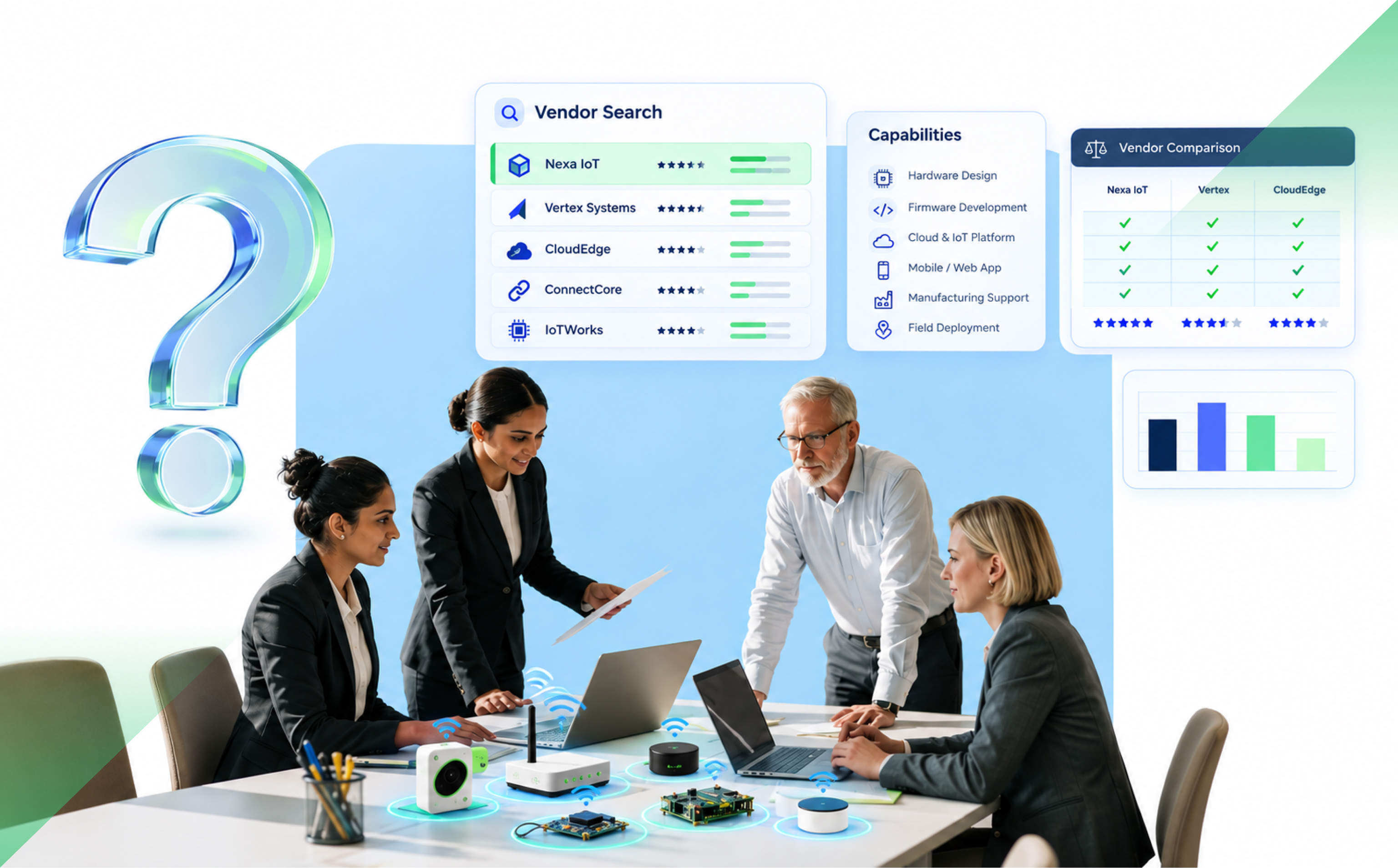
Choosing an IoT engineering vendor can look straightforward at first. You need hardware expertise, firmware developers, cloud capability, maybe an app team. Find people who can do the work, compare proposals, check references, and signs.
Then the product leaves the lab.
Suddenly, a firmware decision affects the board. Connectivity changes what the cloud needs to handle. Manufacturing introduces a new set of constraints. A component becomes difficult to source. The field behaves nothing like the test bench.
That is why the better question isn’t simply, “Can this vendor build what we need?”
It is: “Can this vendor help us take the product from where it is now to where the business needs it to go?”
Start with your product stage, not the vendor’s service list
A company with a working prototype needs something very different from one building its first proof of concept.
That distinction matters. In IoT Analytics’ 2024 research, OEMs took an average of 41 months from project kickoff to the first paying customer. The stretch from proof of concept to first customer alone averaged 22.8 months. Product complexity, regulation and tighter security requirements were among the reasons commercialization had become slower.
So before comparing vendors, define the next business milestone.
Do you need to prove the idea? Prepare for manufacturing? Deploy thousands of devices? Fix a product already struggling in the field?
A vendor that is excellent at prototyping may not be the team you need for production.
Then ask the uncomfortable question: who owns the gaps?
IoT products cross hardware, firmware, connectivity, cloud, applications and operations. That is why the scope of your IoT product engineering partner matters. Those parts can come from different specialists. That’s not automatically a problem.
The problem starts when nobody owns what happens between them.
Cisco’s widely cited 2017 IoT study found that 60% of initiatives stalled at proof of concept. The figure is old and shouldn’t be treated as a current industry failure rate, but one finding is still useful: 54% of respondents named collaboration between IT and the business as the leading success factor.
That tells you something important about vendor selection. Technical competence in isolation isn’t enough.
Ask:
Who owns the system architecture?
Who resolves an issue that touches both firmware and cloud?
Who coordinates a hardware change that affects manufacturing and software?
Who is accountable for the final outcome?
A good engineering partner should reduce the number of problems you have to coordinate, not become another one.
Look past the prototype
A working demo proves that an idea can work under known conditions. Production asks much harder questions.
How will devices be provisioned? What happens when connectivity drops? How are credentials managed? How will firmware be updated? What happens when the fleet grows from hundreds of devices to hundreds of thousands?
Microsoft’s Azure guidance makes this difference very concrete. Its Device Provisioning Service has a hard limit of 1,000 registrations per minute per service instance, which is why Microsoft recommends designing large fleets around provisioning limits from the start rather than treating them as a later problem.
You don’t need your vendor to use Azure. You do need them to think this way.
Ask them what changes when your product moves from 50 devices to 5,000. A strong answer should cover device identity, telemetry, monitoring, recovery, updates and field support, not just “we’ll add more cloud capacity.”
Relevant experience matters more than a long client list
Ten years of experience sounds good. Ten years solving the kinds of problems your product is about to face is better.
Look for evidence that the vendor has worked through production releases, field conditions, component changes, certification, support and product maintenance.
Market experience matters too. If you’re building for the US, ask whether the team understands the operating environment, customer expectations and regulatory requirements your product will encounter.
There is a practical side to this as well. Can your product leaders reach the engineering team when a decision needs to be made? Who joins a call when the issue crosses disciplines? Are the right people available during your working day?
Access is not a soft benefit when engineering decisions affect launch dates.
Ask what happens after the product ships
Shipping isn’t the end of the engineering job for a connected product.
NIST’s updated 2026 guidance for IoT manufacturers now spans both pre-market and post-market activity, including cybersecurity, maintenance, support and product end-of-life.
That gives founders a useful vendor question:
“How will you help us operate this product three years after launch?”
Look for clear thinking around security updates, OTA firmware, diagnostics, component lifecycle, documentation and support ownership.
If the answer stops at deployment, the relationship may stop too early.
Make sure your product can leave the vendor
This sounds contradictory. You’re choosing a long-term partner, so why plan for leaving?
Because good partnerships don’t need captivity.
Clarify who owns the firmware, source code, schematics, PCB files, cloud accounts, credentials, product data and build documentation.
AWS recommends reducing switching risk through portable data, loosely coupled systems, open standards and a clear reversibility plan.
The point isn’t to avoid every proprietary technology. Sometimes the right proprietary service saves time or delivers real value. The point is to understand the dependency before you sign.
A quick decision check
Before appointing an IoT product engineering vendor, you should be able to answer five questions:
Can they take responsibility across the complete product?
Have they taken products beyond prototype and into real use?
Can the right engineering people be reached when decisions need to be made?
Do they have a clear plan for production, deployment and support?
Will you retain control of your product, IP and critical technical assets?
If those answers are clear, you’re comparing more than engineering rates. You’re comparing the likelihood that the product actually gets where it needs to go.
And that is the decision that matters.
Choosing an IoT engineering partner for your next stage?
See how Amazatic brings hardware, firmware, connectivity, cloud, applications, production and field support under one accountable team.
A working hardware prototype feels like a major milestone because it proves the core idea is technically possible. But it does not prove the product is ready for production. Once firmware, connectivity, cloud infrastructure, applications, data, security, and third-party systems have to operate together, a different class of problems appears. That is where many IoT projects start losing time, budget, and momentum.
Why Does a Working IoT Prototype Still Fail to Become a Production-Ready Product?
During prototyping, teams can tolerate manual setup, unstable integrations, limited monitoring, temporary APIs, and a small number of devices. Engineers are close to the system and can intervene whenever something fails.
Production removes that safety net.
The product now has to deal with more devices, more users, different network conditions, unexpected behaviour, software updates, customer support, security requirements, and significantly more data.
The individual hardware components may still work perfectly. The problem is that the device is now only one part of a larger system.
A production IoT product usually has to coordinate:
firmware running on the device
connectivity between the device and external systems
cloud infrastructure
mobile or web applications
APIs and third-party integrations
data storage and processing
security and access control
monitoring and support systems
device updates and lifecycle management
The prototype proves that one part of this system can work. Production proves whether all of it can work together.
That distinction is one of the most common reasons teams underestimate what remains after hardware validation.
Why the software layer becomes the bottleneck
The software stack is actually many stacks firmware, connectivity, cloud/backend, APIs, mobile/web apps, device management, data pipelines and monitoring whose interactions determine readiness. Delays come from cross-layer dependencies, not a single missing component.
Main software layers and why their interactions matter
Firmware: device stability, bootloader layout, OTA support, and rollback partitions.
Connectivity: carrier abstraction, reconnection behavior, and provisioning rates.
Cloud/backend: message brokers, authentication, device registry and scaling patterns.
APIs & app integration: contract stability and latency expectations between cloud and client.
Data pipelines & analytics: ingestion, edge filtering and retention policies.
Security: device identity, credentials, secrets rotation and update trust chains.
When teams treat each layer independently, integration contracts drift: an API change breaks the mobile UI, firmware assumptions force backend redesigns, or telemetry volume spikes cloud costs. Coordination failures — unclear ownership, missing tests for cross-layer flows, and late security decisions — turn software into the primary constraint after hardware validation.
Why skill gaps and the wrong partner slow delivery
IoT delivery needs cross-discipline skills. A partner who covers only one layer (for example firmware-only freelancers) or an overly large systems integrator with long timelines can both create handoff gaps that stall launch.
What a good IoT partner must own
Choose partners who can own end-to-end responsibilities or coordinate tightly across layers. Practical ownership checklist:
Firmware through cloud through app: single-team accountability removes many integration gaps.
Device provisioning and identity design: partner must understand manufacturing constraints and field provisioning.
Testing capability: hardware-in-the-loop, staged OTA, canary rollouts and chaos tests for connectivity/lifecycle events.
Post-launch device operations: monitoring, incident response, and update rollbacks.
Partners that provide cross-layer testing and post-launch support reduce coordination debt and accelerate time-to-market compared with a string of isolated contractors.
Why integration problems often matter more than individual components
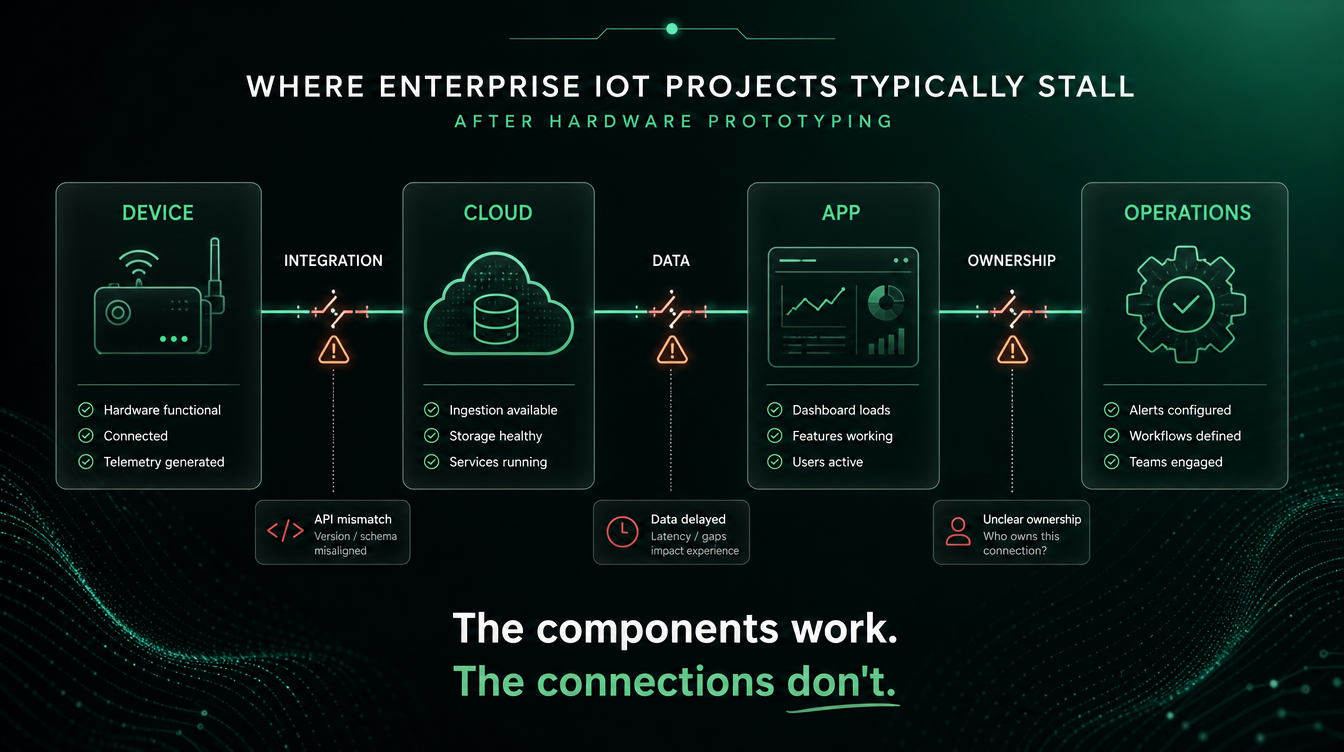
Individual components can function correctly in isolation but still fail as a system when integration contracts and monitoring are missing. Integration points commonly fail because of mismatched assumptions about state, latency, scale, or data shape.
Common failing integration points
Integration
Typical failure mode
Device → Cloud
Heartbeat absent: dead devices look live; retries overload broker
Cloud → App
API contract changes break UI flows; inconsistent object models
Firmware → Backend
Version incompatibility, missing fields, or changed telemetry schema
Data → Analytics
Raw telemetry floods ingestion and inflates costs; poor retention rules
Product → Third-party
Latency or auth mismatches; unpaid rate limits or carrier provisioning headaches
Working components don’t guarantee a working system because the contracts between them data formats, auth flows, backpressure handling, and testing boundaries are often designed late or not tested at scale.
Why security and device identity must be designed early
Identity and credential models are architectural choices that are hard to change after the first production batch ships. Per-device credentials (for example, per-device X.509 certificates provisioned at manufacturing) are expensive to add later and often require field operations or recalls to remediate.
Examples of risks when security is delayed:
Shared credentials: one compromise exposes the whole fleet.
No A/B bootloader partitions: a bad firmware push can brick all devices.
Late credential model changes: require mass firmware updates or hardware recalls.
Fact to note: a single IoT security breach averages about $330,000 in direct measurable impact a figure that underscores why security design early in the product lifecycle matters both operationally and financially.
Why a poor data strategy turns telemetry into an unsustainable cost
Sending unfiltered telemetry at fixed intervals multiplies cloud egress, storage and processing costs with each added device. Without edge aggregation or filtering, costs can grow faster than the value the data provides.
Mitigations:
Edge summarization: pre-process and send only meaningful summaries to the cloud.
Adaptive sampling: increase frequency during events, reduce when idle.
Retention & tiering: keep raw high-value data briefly, archive or discard low-value telemetry.
Case in point: teams that moved filtering to gateways or on-device summarization reduced ingest and storage costs substantially while preserving necessary analytics.
How to diagnose where your IoT project is actually stuck
Run a layered diagnostic that checks one-line readiness for each system layer and then identify the single, highest-priority blocking constraint. Fixing that constraint first is faster than starting a broad rework.
Layered diagnostic checklist
Hardware stability: consistent operation across representative environmental conditions?
Firmware reliability: OTA-capable, rollback partitions, and version compatibility?
Connectivity: provisioning scales, multi-carrier strategy, and reconnection behavior in target environments?
Cloud/backend capacity & APIs: broker clustering, autoscaling, and API contract tests?
Data correctness & usefulness: is the telemetry actionable and cost-justified?
Application UX/integration: does the app handle offline scenarios and partial data gracefully?
Third-party integrations: are rate limits, auth models and SLAs validated?
Security architecture: device identity, credentials, and rotation strategy decided?
Team ownership: clear owners for device ops, backend, and support?
Decision rule: the first check that fails and blocks demonstrable end-to-end flows is your priority — not the longest list of possible improvements.
How to get a stalled IoT project moving again
Diagnose, narrow scope, build one complete vertical slice that proves device→cloud→app flow, harden architecture/security, then validate under realistic operational conditions with staged rollouts.
1. Identify the actual bottleneck
Don’t add headcount or rewrite everything before diagnosis. Use the layered checklist to find where the end-to-end flow fails: firmware, cloud, integration, or operations. Fixing the single blocking constraint delivers the fastest visible progress.
2. Narrow the scope to one valuable use case
Select the smallest set of features, device types and integrations that prove ROI. Shipping a vertical slice — not the full vision — validates production assumptions and unlocks stakeholder support.
3. Build one complete vertical slice
Complete the device→cloud→app loop including provisioning, identity, telemetry, UI flows and billing for one use case. Success criteria should be clear: automated provisioning at target batch size, OTA with rollback, and monitored error rates below a threshold.
4. Fix architecture and security before scaling
Priority architecture fixes include per-device identity (provision at manufacturing where possible), clustered brokers, containerized services per layer, and A/B bootloader partitions for safe updates. Avoid mass rollouts without canary or A/B protections.
5. Validate under realistic operational conditions
Lab tests are necessary but insufficient. Staged field tests expose connectivity variability, lifecycle events and long-tail failures. Use canary releases (start at 1%) and increase with monitoring gates to avoid fleet-wide incidents.
Should you fix the existing system or rebuild it?
Base the decision on a pragmatic scoring of architecture quality, technical debt, documentation, test coverage and reusable functionality. If core identity or update models are fundamentally broken, rebuild may be faster; if the core models are sound, incremental repair usually wins.
Decision checklist (short):
Is the device identity model correct and provable? If yes, repair is likely.
Is there test coverage for end-to-end flows? If no, the risk of incremental patches is higher.
How much reusable functionality exists? High reuse favors repair.
Time-to-market pressure: do you need a fast vertical slice or can you accept a multi-quarter rebuild?
What you need before moving from prototype to production
A compact production-readiness checklist that covers architecture, identity/provisioning, staged OTA with canary and rollback, data strategy, monitoring, tests, ownership, deployment processes, and a clearly defined first production use case.
Production-readiness checklist (compact)
Must-have: per-device identity or provable provisioning process; OTA with A/B bootloader and rollback; clustered message broker; device heartbeat and monitoring; clear owner assignments; defined first use case.
High-priority: containerized services for scaling, a data retention and filtering plan, API contract tests, staged canary rollout procedure.
Negotiable for initial cohort: full multi-region carrier abstraction (can be staged), advanced analytics pipelines (start with summaries), or full commercial features beyond the vertical slice.
Note: some hardware choices lock in later fixes. For example, A/B bootloader layout often locks in when PCB Gerber files are sent to the manufacturer; after that, adding safe partitions requires hardware revisions.
What a stalled IoT project actually costs the business
Delays are not just engineering pain — they are commercial losses. Every quarter a product stays in development is a quarter competitors gain market share, potential revenue is deferred, and stakeholder confidence erodes. Repeated failed launches create brand damage and increase future marketing costs to recover.
Tying technical fixes to commercial outcomes — time-to-market, expected first-year revenue, and churn risk — helps prioritize remediation funding.
The prototype proves the idea; production proves the product
Moving from prototype to production is a systems and business decision — not only an engineering checklist. Start by running a layered diagnostic, pick a narrow vertical slice that proves device→cloud→app ROI, and then decide repair vs rebuild using the decision criteria above. Prioritize per-device identity, safe OTA and data filtering before scaling.
Next step (soft CTA): If your project is stalled, take a quick IoT Readiness Diagnostic to identify the single layer blocking progress and download the Production-Readiness Checklist to start a focused remediation plan.
Frequently Asked Questions
Why do IoT projects fail after a successful hardware prototype?
Because production requires cross-layer systems (firmware, connectivity, cloud, security and data strategy) to work together reliably at scale, and those integration contracts are often designed or tested too late.
What is the fastest way to find the single bottleneck in my IoT project?
Run a layered diagnostic checklist (hardware, firmware, connectivity, cloud, data, app, security, ownership) and prioritize the first failing check that blocks an end-to-end device→cloud→app flow.
When should we bring in an external IoT software partner?
Bring them in when your team lacks clear ownership across multiple layers or when you need cross-layer accountability (firmware→cloud→app) to eliminate integration risk quickly. Prefer partners who can deliver end-to-end vertical slices and run post-launch operations.
How do we decide whether to repair the existing system or rebuild it?
Use a scoring framework around identity model correctness, test coverage, documentation and reusable functionality. If identity/update models are fundamentally broken, rebuilding may be necessary; otherwise targeted repairs and improved ownership are usually faster and cheaper.
What are the must-have protections for firmware rollouts to avoid bricking a fleet?
Implement A/B bootloader partitions, canary rollouts that start at ~1%, automated rollback on failure, staged monitoring gates, and ability to pause or revoke updates centrally.
IoT integration connects devices, gateways, edge systems, cloud infrastructure, data platforms, and enterprise applications so telemetry and commands can move reliably across the entire technology stack. At enterprise scale, this requires more than device connectivity: teams must address protocol interoperability, data normalization, event processing, security, system integration, and operational scalability. This guide explains the architecture behind enterprise IoT integration, its major technical challenges, and how these patterns are applied across real-world enterprise use cases.
What IoT integration actually does for enterprise systems
IoT integration turns device-generated data into reliable, contextualized events that enterprise systems can consume and act on. The objective is not simply to move telemetry from a sensor to the cloud. It is to preserve device identity, normalize data, apply business context, route events to the right consumers, and enable applications such as ERP, MES, CMMS, analytics platforms, and automation systems to respond predictably.
A device publishing temperature readings over MQTT may be successfully connected. But if downstream systems cannot associate those readings with the correct asset, normalize the units, handle schema changes, identify duplicate events, or trigger the appropriate maintenance workflow, the device is not meaningfully integrated into the enterprise.
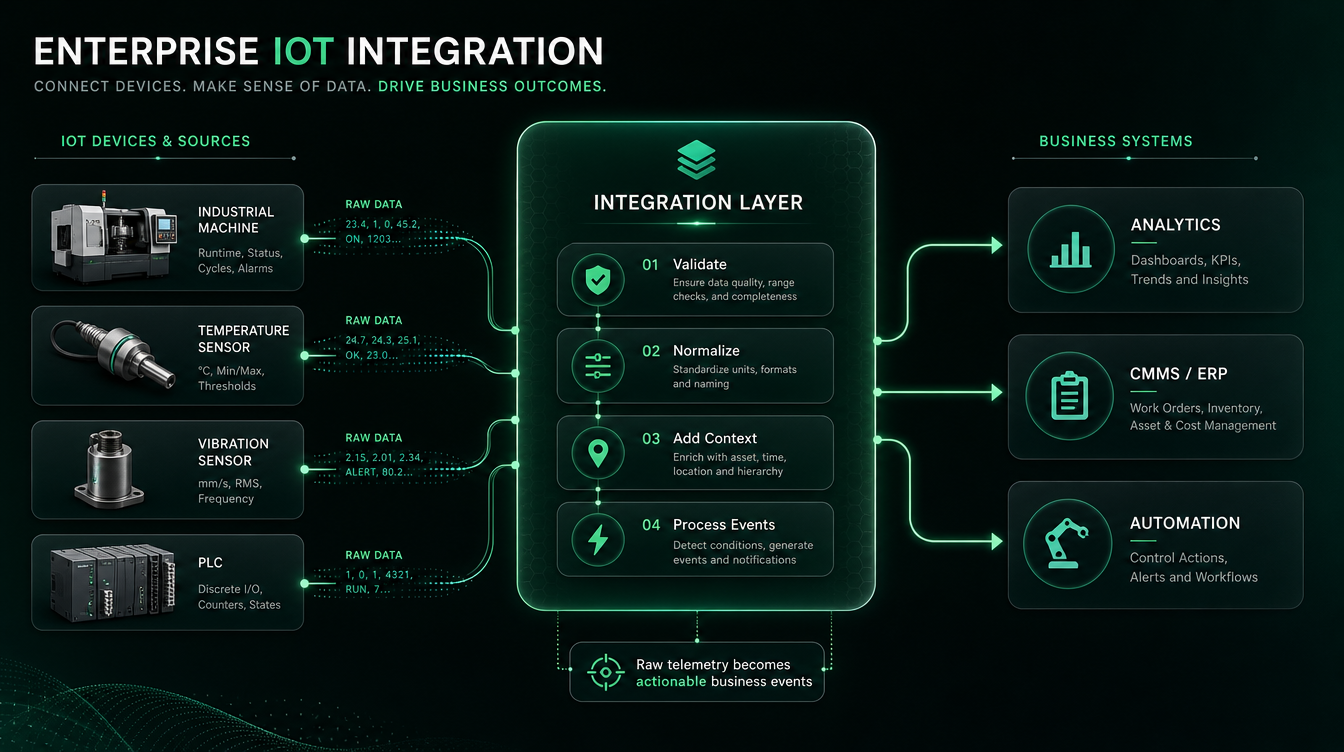
For example, a vibration sensor may continuously publish machine telemetry. The integration layer can validate the payload, associate the device with a specific production asset, enrich the event with operating context, detect an abnormal condition, and pass a maintenance event to a CMMS or ERP system. The business application receives the event it needs rather than the entire raw telemetry stream.
Definition and Business Outcomes
At its core, IoT integration connects sensors, controllers, gateways, edge systems, messaging infrastructure, data platforms, and applications so physical-world events become dependable inputs to digital business processes.
The value comes from what happens after connectivity has been established.
Operational automation: Device events can trigger rules, control processes, alerts, or downstream workflows without continuous manual intervention. Depending on latency and safety requirements, some control loops remain at the device or edge while higher-level automation is coordinated through enterprise systems.
Predictive and condition-based maintenance: Equipment telemetry can be combined with asset context and analytical models to identify abnormal operating conditions. Instead of stopping at an anomaly dashboard, the integration layer can pass a qualified maintenance event into a CMMS, MES, or ERP workflow.
Operational visibility: IoT integration creates a consistent path from distributed physical assets into centralized monitoring and analytics systems, allowing operations teams to correlate device state, asset performance, production conditions, and other operational data.
Compliance and traceability: Environmental, cold-chain, safety, and industrial monitoring systems can preserve timestamped measurements and operational events required for audit trails, investigations, and regulatory reporting.
Cross-system automation: IoT becomes significantly more valuable when physical events can interact with existing business systems. A machine condition may initiate maintenance; a connected product may create a service case; an inventory sensor may trigger replenishment; or an asset-state change may update an operational workflow.
From Telemetry to Business Events
One of the most important architectural distinctions is between telemetry events and business events.
A connected machine may generate thousands of measurements. An ERP or maintenance system does not need thousands of raw sensor messages.
Instead, the integration architecture should transform:
Raw telemetry → validated data → contextualized state → business event
For example:
Temperature readings → threshold/state evaluation → overheating condition → maintenance event → CMMS work order
This separation prevents high-volume device traffic from being coupled directly to transactional enterprise applications.
It also allows multiple systems to consume the same underlying device information differently. Raw telemetry might go to a time-series store, aggregated measurements to an analytics platform, anomalies to an operations dashboard, and only qualified business events to ERP or maintenance systems.
Why Context Matters as Much as Connectivity
Raw sensor values have limited enterprise value without context.
A payload such as:
temperature = 82.4
does not tell an enterprise application:
which device generated it,
which physical asset that device belongs to,
where the asset is located,
which unit of measurement is being used,
which firmware or schema version produced the event,
whether the reading is valid,
or what business process should respond.
Enterprise IoT integration therefore needs mechanisms for data normalization and contextualization, not merely transport.
This becomes especially important when integrating equipment from multiple vendors because different systems may represent the same physical measurement using different payload structures, identifiers, units, and protocols.
A stable integration layer prevents every downstream application from having to understand every device-specific representation.
Common Integration Failure Modes
IoT integrations often fail at the boundaries between systems rather than inside individual components.
Security and identity gaps: Devices deployed without a defined identity, credential lifecycle, authorization model, secure update mechanism, or decommissioning process can create security and operational problems as the fleet grows.
Protocol mismatch: Devices and industrial equipment may communicate through MQTT, OPC UA, CoAP, HTTP, proprietary protocols, or other interfaces. Without a deliberate protocol boundary, translation logic becomes scattered across the architecture.
Data and schema mismatch: Even when systems can exchange messages, differences in payload structure, identifiers, units, timestamps, and schema versions can break downstream consumers. Schema evolution therefore needs to be treated as an integration concern rather than only a firmware concern.
Tight point-to-point coupling: Directly connecting individual devices to business applications creates dependencies that become difficult to maintain as the number of devices and consuming systems increases. Messaging and event-driven patterns can decouple producers from consumers.
Duplicate or delayed events: Intermittent connectivity, retries, and message redelivery can cause events to arrive late or more than once. Systems that trigger business actions need appropriate event identification, deduplication, and idempotent processing.
Missing operational processes: A technically functional integration can still fail in production without monitoring, staged software updates, failure recovery, observability, and clearly defined ownership between device, cloud, IT, and OT teams.
The result is an important architectural principle: successful IoT integration is not measured by whether a device can publish data. It is measured by whether the enterprise can reliably interpret that data, preserve its context, route it safely, and turn it into the correct operational or business action.
What an enterprise IoT architecture looks like (the six layers and where integration happens)
Enterprise IoT architecture connects physical devices with edge infrastructure, communication networks, data platforms, and business applications. While architectures vary by industry and scale, the core challenge remains the same: data has to move from constrained and heterogeneous devices into enterprise systems without losing reliability, security, or context along the way.
A practical way to understand the architecture is through six functional layers: devices, edge and gateways, connectivity and messaging, data processing, enterprise applications, and cross-cutting security and operations. Integration happens at the boundaries between these layers, where protocols, data formats, ownership, and system behaviour have to align.
Device and Perception Layer
The device layer is where physical events first become digital data. It includes sensors, actuators, PLCs, embedded controllers, smart meters, connected equipment, and other systems that measure or interact with the physical environment.
The main integration challenge at this layer is heterogeneity. Devices from different manufacturers may expose different protocols, payload formats, sampling frequencies, identifiers, and processing capabilities. An industrial PLC may expose structured machine data through OPC UA, while a constrained sensor may transmit a small telemetry payload using a lightweight communication protocol.
Hardware limitations also affect architecture. Battery-powered devices have very different compute, memory, bandwidth, and power constraints from industrial gateways or connected machinery. These constraints determine how much processing can happen locally, how frequently data can be transmitted, and which security mechanisms are practical.
The objective at this layer is therefore not simply to collect as much telemetry as possible. Device data should be generated in a way that downstream systems can reliably identify, interpret, and process.
Edge and Gateway Layer
The edge or gateway layer sits between field devices and centralized IoT infrastructure. It becomes particularly important when devices use different protocols, operate on constrained networks, or require processing close to where data is generated.
Gateways can translate device-specific protocols into interfaces understood by upstream systems. They may also filter telemetry, aggregate measurements, buffer events during connectivity loss, execute local rules, and perform preliminary analytics before sending information to the cloud.
Consider a manufacturing environment where machines expose data through OPC UA while the central IoT platform consumes MQTT messages. An edge gateway can read the industrial data, normalize the required fields, and publish relevant events upstream without requiring the cloud platform to understand every machine-specific interface.
Edge processing also reduces unnecessary network traffic. A machine producing measurements several times per second may not need to transmit every reading. The edge layer can calculate aggregates, detect state changes, or forward only exceptions and relevant operational events.
This makes the gateway more than a connectivity component. It acts as an integration boundary between OT and IT, isolating device-specific complexity from the systems that consume the data.
Connectivity and Messaging Layer
Once data leaves the device or gateway environment, it needs a communication layer capable of moving telemetry upstream and commands downstream.
This is where technologies such as MQTT, HTTP, AMQP, cellular networks, Wi-Fi, Ethernet, and other connectivity mechanisms enter the architecture. They solve different problems, so protocol selection should be based on communication requirements rather than treating them as interchangeable technologies.
Messaging architecture is particularly important at enterprise scale. Directly connecting every device to every application creates tight dependencies between producers and consumers.
Instead of:
Device → Business Application
a scalable architecture typically introduces an intermediary:
Device/Gateway → Messaging or Ingestion Layer → Multiple Consumers
The same equipment event can then be consumed independently by monitoring, analytics, storage, alerting, digital-twin, and enterprise integration services.
This separation allows the device layer and application layer to evolve independently. Adding a new analytics platform, for example, should not require changing firmware across the device fleet.
The messaging layer must also account for unreliable connectivity, retries, delayed events, duplicate delivery, and sudden traffic bursts when large numbers of devices reconnect after an outage.
Data Processing and Integration Layer
Receiving telemetry does not automatically make it usable.
The data processing layer is responsible for turning device-specific messages into consistent information that other systems can understand. This may include schema validation, transformation, filtering, aggregation, normalization, enrichment, event processing, and routing.
For example, three manufacturers might describe the same temperature measurement differently:
temp: 42.1
temperature_c: 42.1
sensor_temperature: 42.1
All three devices are technically connected, but downstream applications still need a consistent representation. The integration layer can normalize these payloads into a common data model before exposing them to analytics or business applications.
Context is equally important. A value of 42.1°C has limited meaning unless the system knows which device generated it, which physical asset the device belongs to, where that asset is located, when the measurement occurred, and what operating state the equipment was in.
This is where IoT integration starts moving beyond simple data transport. The architecture converts raw telemetry into contextualized operational information.
It also needs to manage schema evolution. Firmware and device models change over time, and newer versions may produce different payload structures. Without versioning and compatibility rules, a seemingly small firmware change can break analytics pipelines and downstream applications.
Application and Enterprise Systems Layer
The application layer is where IoT information becomes part of business operations.
Consumers may include dashboards, analytics platforms, ERP systems, MES, CMMS, CRM platforms, digital twins, customer applications, and automation engines.
A critical architectural principle is that these systems should not necessarily consume raw device telemetry.
A machine may generate thousands of measurements during normal operation, while a maintenance system may only need to know that the equipment has entered an abnormal condition.
The integration path might therefore look like:
Machine telemetry → Processing → Condition detected → Maintenance event → CMMS work order
Similarly, a connected product might generate continuous operational telemetry while the CRM only needs events such as device activation, service required, or subscription usage threshold reached.
This distinction between telemetry events and business events prevents high-volume IoT traffic from becoming tightly coupled to transactional enterprise applications.
It also allows the same underlying telemetry to serve different purposes. Raw measurements can be stored for engineering analysis, aggregated data can feed dashboards, anomalies can trigger alerts, and qualified business events can initiate enterprise workflows.
Security, Operations and Lifecycle Management
Security and operations should not be treated as separate final stages of IoT architecture. They apply across the entire path from the physical device to the enterprise application.
Devices need reliable identities and authentication mechanisms. Communication needs appropriate protection. Services need authorization boundaries. Commands sent back to devices need stricter controls than ordinary telemetry ingestion. Credentials, firmware, and configuration also need lifecycle management as devices are deployed, updated, transferred, or retired.
Operational visibility is equally important.
A production IoT platform should make it possible to determine whether a problem originated in the device, gateway, network, messaging layer, processing pipeline, or downstream application.
That requires monitoring across the architecture, including device connectivity, gateway health, message ingestion, processing failures, rejected payloads, queue depth, downstream API failures, and command-delivery status.
Without end-to-end observability, teams may know that “IoT data is missing” while spending hours determining which layer actually failed.
The architecture therefore succeeds not merely when telemetry reaches the cloud, but when devices, edge infrastructure, messaging, data processing, and enterprise applications can operate as one observable and manageable system.
Why protocol and connectivity choices determine system trade-offs
Protocols and network choices set latency, bandwidth, security and interoperability constraints — pick them based on the use case, not because a vendor prefers them.
Protocol selection criteria
Decide using these variables: latency requirements, bandwidth availability, reliability, device constraints (power/CPU), security needs and the required level of vendor/industry interoperability. A short mapping follows.
Short-range device meshes and consumer/edge device connectivity
Common mistakes and how to avoid them
Mixing incompatible protocols without a gateway: introduce a gateway layer for safe translation and policy enforcement.
Assuming TCP everywhere: some LPWAN and constrained networks need UDP-based or specialized transports.
Ignoring data formats: JSON is easy but large; use CBOR or binary formats where bandwidth or parsing cost matters.
How edge computing and gateways reduce latency and integration friction
Edge computing and IoT gateways process data closer to devices instead of sending every event directly to centralized cloud infrastructure. This reduces response latency, limits unnecessary bandwidth consumption, improves resilience during connectivity disruptions, and provides a controlled integration boundary between OT devices and enterprise systems.
Gateway Roles and Responsibilities
Protocol translation: Gateways bridge devices and backend systems that use different communication protocols. For example, they can translate data from OPC UA, Modbus, BLE, or proprietary device protocols into MQTT or HTTP-based messages that cloud and enterprise platforms can consume.
Local buffering: When cloud or network connectivity is interrupted, gateways can temporarily store device data and forward it once connectivity is restored. This store-and-forward capability helps prevent temporary network failures from becoming permanent data loss.
Data filtering and aggregation: Not every sensor reading needs to reach the cloud. Gateways can filter unnecessary telemetry, aggregate measurements, calculate summaries, or forward only significant state changes and exceptions, reducing upstream traffic and processing requirements.
Policy enforcement: The gateway can act as a controlled boundary between OT and IT environments by enforcing authentication, access policies, traffic rules, and network segmentation before device data reaches enterprise infrastructure.
Edge analytics and inference: Analytics or machine-learning models can run locally to identify anomalies, classify events, or trigger immediate actions without waiting for cloud processing. This is particularly useful when low latency or continued operation during connectivity loss is required.
Local decision-making: Time-sensitive workflows can execute at the edge rather than depending on a round trip to the cloud. Cloud systems can still receive the resulting events for historical analysis, fleet-wide visibility, and enterprise workflows.
Device abstraction: Gateways can hide vendor- and protocol-specific differences behind a more consistent upstream interface. This prevents cloud applications from having to understand the implementation details of every device type deployed across the IoT environment.
When to process at the edge vs cloud
Use this checklist: latency needs (edge if milliseconds matter), bandwidth cost (edge if sending raw data is expensive), privacy/compliance (keep sensitive data local), resilience (edge continues when cloud is unreachable), and model/update cadence (cloud for heavy retraining; edge for small, fast models).
Why security and device identity must be designed across the lifecycle
IoT security cannot be added after devices are deployed. It must extend across the complete device lifecycle—from initial provisioning and authentication to software updates, credential rotation, monitoring, and eventual decommissioning. Because devices interact continuously with gateways, cloud services, and enterprise applications, weaknesses in device identity or lifecycle management can compromise the wider integration architecture.
Core Lifecycle Controls: Identity, Provisioning and OTA
Every device needs a trustworthy identity so the platform can determine which device is connecting and what it is authorized to do. Secure provisioning establishes this trust when a device is manufactured, commissioned, or first connected. Depending on the architecture, identity may be implemented using certificates, hardware-backed credentials, or other cryptographic mechanisms.
Lifecycle security must continue after deployment. Devices may remain operational for years, during which vulnerabilities are discovered, certificates expire, configurations change, and firmware requires patches. A secure over-the-air (OTA) update mechanism allows organizations to distribute authenticated firmware and security fixes without physically accessing every device.
Update integrity, rollback protection, credential management, and secure decommissioning therefore become part of the integration architecture rather than separate maintenance activities. NIST’s IoT cybersecurity guidance similarly identifies capabilities around device identification, data protection, logical access, secure software updates, and cybersecurity-state awareness as important elements of device security.
Architecture-Level Security Decisions
Security also has to be enforced between architectural layers. OT devices should not automatically receive unrestricted access to enterprise networks simply because they are authenticated. Network segmentation, controlled gateway boundaries, least-privilege authorization, and service-level access policies help limit how far a compromised device or service can reach.
Certificate and key management must also account for issuance, storage, rotation, revocation, and expiration across potentially large fleets. X.509 certificates and PKI are common enterprise approaches, but the appropriate identity mechanism depends on the device capabilities, platform, deployment environment, and threat model.
The key principle is that identity, updates, authorization, network boundaries, and lifecycle operations must be designed together. At enterprise scale, retrofitting these controls after deployment can require changes across devices, gateways, cloud services, and operational processes.
How platform and tool choices shorten or lengthen time to value
Direct answer: Choose a platform by deciding which integration responsibilities you will outsource; platform selection shapes cost, vendor lock-in and operational burden.
Middleware reduces custom connectors for enterprise systems (ERP, CRM, MES) and accelerates integration when internal expertise is limited. It adds cost and sometimes complexity — use it when you need rapid integration across many back-end systems or when your team prefers configuration over code.
What operational practices solve device and fleet management at scale
Production fleets require secure provisioning, staged OTA rollouts, continuous monitoring, and clear support workflows to avoid field maintenance costs and downtime.
Provisioning, identity and staged rollouts
Use unique device identities issued during manufacturing or first-boot provisioning. Staged OTA rollouts (canary → small cohorts → full fleet) reduce risk and allow rollback. Never update the entire fleet without a staged validation plan.
Monitoring, diagnostics and support workflows
Collect health telemetry (uptime, connectivity, error rates), enable remote diagnostics (log fetch, limited remote shell) and define escalation paths. Observability should detect fleet issues before users report them.
How to turn IoT data into analytics and AI that deliver business value
Design data pipelines from ingestion to action: collect, store (time-series DB or data lake), analyze (streaming & batch), and automate actions — using digital twins or edge ML where appropriate.
Data pipeline architecture choices
Use message brokers/streams for ingestion, time-series databases for high-cardinality sensor data, and data lakes for long-term historical analysis. Streaming analytics enable near-real-time rules; batch analytics support complex model training.
Where to run ML: edge vs cloud
Run ML at the edge when you need low latency or to reduce bandwidth (small models for anomaly detection). Use cloud ML for retraining, larger models and centralized model management. Base the choice on latency, model size, update frequency and privacy concerns.
What an IoT integration roadmap and deployment checklist must include
De-risk with a vertical-slice pilot that proves device→gateway→cloud→app workflows under production conditions and defines acceptance criteria before scale.
Stepwise deployment checklist
Define objectives and measurable outcomes (what success looks like).
Inventory existing systems and devices; map IPs and network boundaries.
Create a security and provisioning plan (identity, certificates, OTA strategy).
Run a vertical-slice pilot with production security and monitoring.
Validate under realistic load and environmental conditions.
Define scaling plan, operational runbook and support SLAs.
QA, observability and acceptance criteria
Make pilot acceptance criteria measurable: uptime, message delivery latency, packet loss/error rates, successful staged OTA rate, and security posture (certificate rotation, vulnerability scan results).
What industries gain most from integration (short, practical use cases)
Manufacturing — problem: unscheduled downtime; IoT solution: sensor telemetry + predictive analytics to plan maintenance; expected benefit: reduced unplanned downtime and more efficient maintenance scheduling.
Logistics — problem: spoilage in the cold chain; IoT solution: temperature/humidity monitoring with alerts and audit trails; expected benefit: improved compliance and lower spoilage risk.
Healthcare — problem: limited remote monitoring; IoT solution: connected patient monitors and telemetry integrated into clinical systems; expected benefit: earlier intervention and better patient follow-up.
Smart buildings — problem: energy waste and comfort complaints; IoT solution: integrated HVAC, occupancy and energy monitoring with automated control; expected benefit: improved occupant comfort and energy efficiency.
What hidden costs and scaling risks you must plan for
Direct answer: Hidden costs include cloud ingestion and storage fees, connectivity charges, OTA support and field maintenance. Early architecture choices (how much you filter at the edge, retention policies) materially affect long-term operating cost.
Primary cost categories and mitigation
Cloud ingestion/storage: mitigate with edge filtering and retention policies.
Device maintenance/OTA: plan staged rollouts and robust OTA to avoid costly site visits.
Connectivity fees: choose protocols and carriers that fit telemetry volume and frequency.
Support & operations: invest in monitoring, automation and clear ownership to reduce reactive costs.
Planning realistic ROI timelines
Define short-term wins (pilot metrics like reduced manual checks), medium-term benefits (reduced maintenance costs, fewer field visits) and ongoing value (automation and analytics). Use pilot acceptance criteria to validate ROI milestones before full-scale investment.
How to diagnose integration problems and decide whether to fix or rebuild
Direct answer: Diagnose in sequence to find the first blocking constraint, then use objective criteria (technical debt, security gaps, test coverage, reusable components, time-to-market) to decide fix vs rebuild.
Diagnostic framework (sequence to find the real bottleneck)
Hardware: check device health, sensors and power constraints.
Firmware: verify firmware versions, logging and crash handling.
Connectivity: measure packet loss, latency and retransmissions.
Cloud ingestion: inspect broker throughput, error rates and message formats.
Data & app: validate parsing, schema mismatches and downstream errors.
Integrations & security: test auth, certificate validity and segmentation.
Ownership & processes: confirm who handles incidents and runbooks.
Decision framework: fix vs rebuild
Consider rebuild when architecture lacks core capabilities (no identity model, no OTA), documentation/test coverage is poor, security posture is insufficient, or cost/time to retrofit exceeds a scoped rebuild. Choose repair when issues are isolated, components are modular and remediation is low-risk.
What you need before moving an IoT solution to production
Direct answer: Production readiness requires an architecture document, security model, device management and a monitoring/observability plan plus documented ownership and SLAs.
Production readiness checklist (concise and actionable)
Architecture diagram and responsibilities across layers.
Defined communication model and protocols.
Secure provisioning and device identity plan.
OTA strategy with staged rollout and rollback.
Monitoring, logging and alerting for fleet health.
End-to-end QA test coverage for telemetry and security.
Support runbooks, documented ownership and SLAs.
Why integration, not devices, decides whether IoT delivers ROI
Devices supply signals; integration turns signals into reliable actions and measurable outcomes. Prioritise protocol choices, edge/gateway design, embedded security, data pipelines and operational practices. Two immediate next steps: run the diagnostic sequence above to find your blocking constraint and execute a vertical-slice pilot that proves an end-to-end workflow under production conditions.
Ready to move from pilot to production?
If you need an independent IoT readiness diagnostic or help running a secure vertical-slice pilot, request a short assessment to identify the single biggest blocker and an actionable remediation plan.
Contact your integration partner or consult an IoT engineering team to schedule the diagnostic.
Frequently Asked Questions
Is IoT secure enough for enterprise use? Yes—when identity, provisioning, encryption and firmware lifecycle controls are implemented and continuously managed. Follow NIST guidance and embed security into your architecture rather than retrofitting it.
Do I need 5G for enterprise IoT? Not necessarily. 5G helps low-latency and high-throughput scenarios, but many enterprise use cases (asset tracking, environmental sensors) are well served by LPWAN, LTE‑M or Wi‑Fi.
How long does it typically take to see ROI from an IoT project? ROI depends on scope. Expect pilots that validate workflows in weeks to months and scaled ROI over months to a few years depending on operational change and asset lifetime.
How do I troubleshoot intermittent device connectivity? Use a diagnostic sequence: verify device firmware and health, check gateway buffering and retry policies, measure network conditions, and ensure correct back-end ingestion and timeouts.
When should I bring in an external IoT integration partner? Bring in external expertise when your team lacks secure provisioning, OTA experience, industrial protocol expertise (OPC UA) or when you want to accelerate a vertical-slice pilot with production-grade security and monitoring.
References: NIST SP 800-213; NISTIR 8259; AWS IoT Core; Microsoft Azure IoT Edge; OPC Foundation materials.
Summary
This article explains why integration — not devices — determines IoT success. Use a six-layer architecture, choose protocols to match use cases, embed security across the device lifecycle, leverage edge for latency and cost control, and apply disciplined operational practices (provisioning, staged OTA, monitoring). Start with a vertical-slice pilot and an honest diagnostic to de-risk scale.
You signed four sensible contracts. A hardware firm for the device. A firmware team for the code. A cloud provider for the platform. An app studio for the interface. Each one was the right call on its own. And now? Most of your week goes into status calls, chase-up emails, and figuring out whose problem the latest bug actually is. The vendors were the cheap part. Managing them is what’s quietly draining you.
Here’s the short answer for anyone skimming: the real cost of running multiple IoT vendors isn’t in their invoices. It’s in the coordination, the delays, and your own time, and it rarely shows up as a line item until it’s already hurt you.
Why splitting the work looks smart
Let me be fair to the decision first. An IoT productneeds hardware, firmware, connectivity, cloud, and analytics, and as STL Partners points out, that’s a spread of skills you almost never find in one engineer. So you hire specialists. Makes sense. On paper.
The trouble is that the bill for coordination never lands on any one desk. It hides in the gaps between your vendors, and those gaps get more expensive the more of them you have.
Where the money actually goes
Start with your time, because that’s the cost founders feel first. One study found that 25% of IT time gets spent just managing vendors, and that 94% of executives say manual vendor management leads to poor spending decisions (Spendesk, 2025). A quarter of your team’s attention, gone to herding suppliers instead of building the product. Nobody budgets for that. Everybody pays it.
Then there’s delay, and this is where IoT gets brutal. Internal, multi-vendor IoT projects run 40 to 60% over their timelines on average, so a six-month deployment quietly becomes ten (s2s Communications, 2026). And the opportunity cost while everyone waits, leadership refereeing vendor disputes, ops managers stuck babysitting installs, lands somewhere between $15,000 and $25,000 a month for a mid-sized deployment (s2s Communications, 2026). Again, none of that appears in the original budget.
When your vendors point at each other, you’re the one holding the customer. And the clock.
Why do the delays happen? Because every vendor you add is another seam. As one implementation team put it, the more components you connect, the more interactions there are between them, and even a small mismatch in data formats or timing can break the flow and cause failures that are hard to trace (Bamboo Agile, 2026). That’s the blame game in a sentence. Nobody’s lying. Everybody’s a little bit right. And you lose weeks finding the root cause anyway.
It compounds, too. The setup that runs fine with two or three vendors, as one procurement analysis notes, fundamentally breaks at ten or more (Inch Creative, 2026). And value keeps leaking even after the ink dries. A recent World Commerce & Contracting report found that procurement contracts lose an average of 11% of their value after signing, thanks to poor governance, missed renewals, and unclear ownership (WorldCC, January 2026). Split that ownership across five vendors and you can guess which way that number moves.
The part that should keep a founder up at night
Now zoom out, because this is bigger than annoyance. It’s about the runway.
The baseline time-to-market for a new IoT product has stretched to 41 months from kickoff to first paying customer, up from 23 months back in 2020, with the proof-of-concept-to-revenue gap alone averaging almost 23 months (IoT Analytics 2024 Commercialization Report, via TechStory). Sit that next to the money. The median gap from seed to Series A is now 2.2 years, and most hardware founders plan for roughly 24 months of cash (Carta, State of Seed 2025). See the problem? The standard IoT launch already outruns the runway most founders have.
And when the cash runs out, the story ends. CB Insights found that running out of money is the number one reason startups fail, at 38%. So every month your vendors spend pointing fingers isn’t just a delay. It’s a bite out of the one resource you can’t refill.
Runway isn’t a budget. It’s a deadline.
So what actually helps
I’ll say the obvious thing, then the useful thing. The obvious thing: fewer vendors, less coordination. It’s why so many companies are now trying to cut their vendor count by 20% (Proven IT, 2026).
The useful thing is a little different. It’s not really about the number of vendors. It’s about who owns the outcome. When one team is answerable for the whole product, the seams stop being your problem. There’s one root cause instead of five, one contract instead of a pile, and one partner you can reach in your hours when something breaks. Familiarity with your market, closeness you can actually call on, and coverage across the whole build. That’s what turns coordination back into building.
Because here’s the thing you already know in your gut. You didn’t start a company to manage vendors. You started it to ship a product. The coordination was never supposed to be the job.
What does it actually cost to manage multiple IoT vendors?
The biggest costs aren’t the invoices, they’re coordination and time. Around 25% of IT time goes to managing vendors (Spendesk, 2025), and multi-vendor IoT projects run 40 to 60% over their timelines, carrying $15,000 to $25,000 a month in opportunity cost for a mid-sized deployment (s2s Communications, 2026).
Why do IoT products get delayed when several vendors are involved?
Every vendor adds a seam, and the more components you connect, the more ways they can misalign. Even a small mismatch in data formats or timing can break the flow and cause failures that are hard to trace (Bamboo Agile, 2026). Diagnosing those failures across separate vendors is where the weeks disappear.
How many IoT vendors is too many?
There’s no fixed number, but coordination that works fine with two or three vendors tends to break down at ten or more (Inch Creative, 2026). The real question isn’t the count, it’s whether a single team is accountable for the whole product or whether that job has quietly landed on you.
Is it cheaper to use one IoT partner or several specialists?
Several specialists often look cheaper on the quote, but the total cost tells a different story once you add coordination time, delays, and contract value lost to unclear ownership, which averages 11% after signing (WorldCC, January 2026). One accountable partner usually wins on total cost and time to market, even when the headline price looks higher.
A customer contacts support for the third time. The AI asks for the order number again. An employee opens an internal assistant and has to explain the same project from scratch.
Deloitte predicted that 25% of enterprises using generative AI would deploy AI agents in 2025, rising to 50% by 2027. Accenture found that 48% of CxOs said their organisations lacked enough high-quality data to put generative AI into operation.
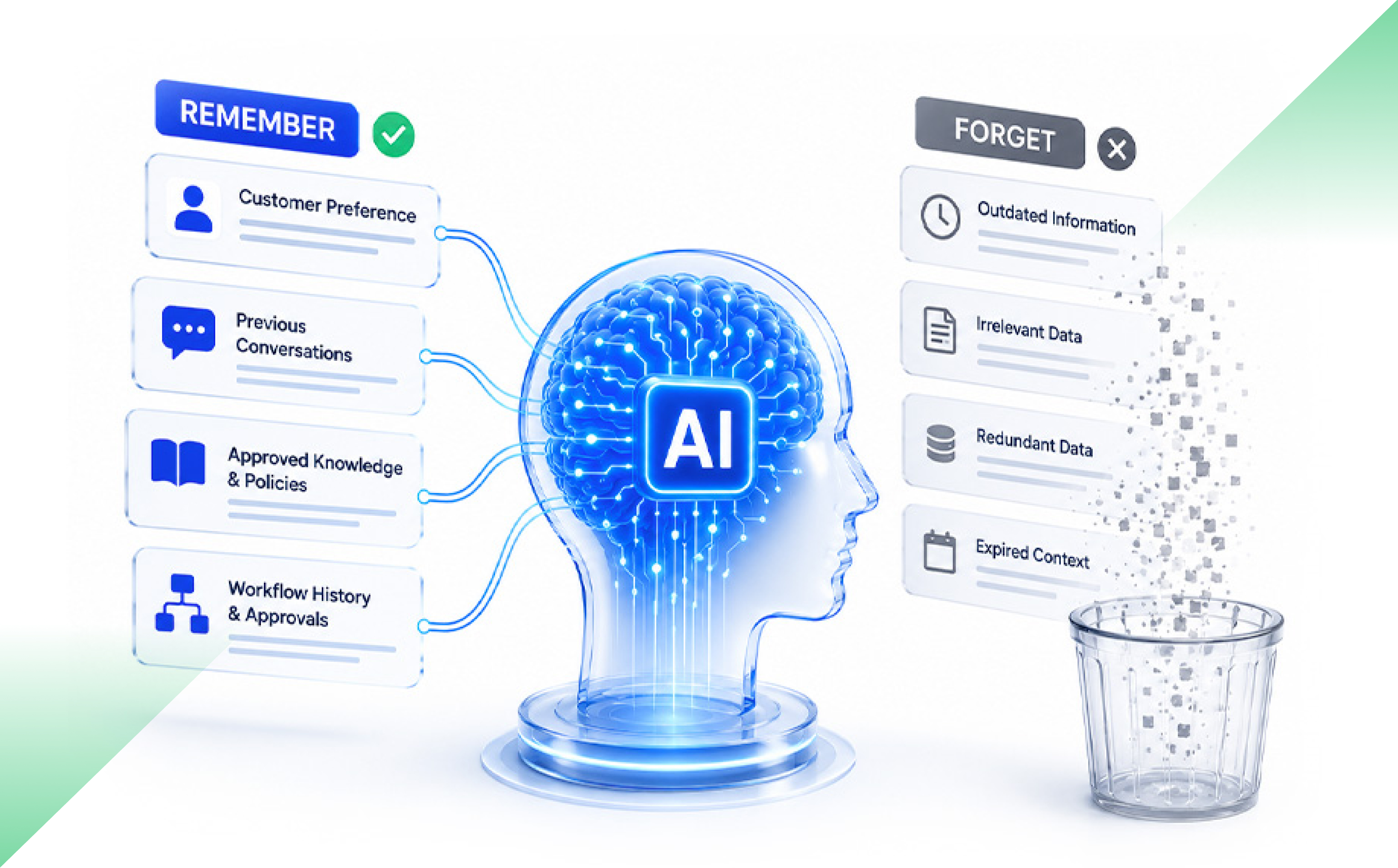
The answer is not to make AI remember everything. It is to build an AI memory architecture that decides what is worth keeping.
What Is AI Memory?
Microsoft describes a single ageAI memory is the information an AI system keeps and recalls across a task, conversation or longer period. It can include previous messages, user preferences, workflow history, corrections and approved organisational knowledge.
Useful memory improves context. Poorly governed memory can surface stale, incorrect or restricted information. It can also raise costs and slow responses.
AI Memory Is Not Just Another Database
Traditional software stores known facts: a customer ID, invoice status or workflow stage. These records have defined fields and owners.
AI memory may contain a conversation summary, a past correction or an inference made by the model. The AI uses that material to shape its next answer or action.
Microsoft warns that fragmented or poorly governed information can lead AI agents to produce misleading results and create security risks. Memory therefore needs clear sources, permissions, retention rules and owners.
What Types of AI Memory Does a Business Need?
A useful starting point is to separate memory into four types.
Session memory holds context for one conversation or task.
User memory stores confirmed preferences across sessions.
Workflow memory tracks approvals, completed steps, exceptions and unresolved issues.
Organisational memory provides authorised access to policies, procedures and approved business knowledge.
These memory types should not have the same lifespan. Amazon Bedrock, for example, lets teams set agent memory retention from 1 to 365 days. The correct period depends on why the information is being stored.
A support conversation may need memory for a few hours. A claims process may need workflow context for several months. A user preference may remain useful for longer, but only while it stays accurate.
Can Too Much AI Memory Reduce Accuracy?
Yes. More context does not always produce a better answer.
AWS guidance notes that growing memory can increase retrieval costs, consume more context tokens and add delay. Each extra item may need to be searched, ranked and passed to the model. Uncontrolled memory growth can also create compounding costs because retained context may be processed during later requests.
Quality can fall too.
The “Lost in the Middle” study by researchers from Stanford University, UC Berkeley and Samaya AI found that language models often performed best when relevant information appeared near the beginning or end of a long input. Performance dropped when the same information appeared in the middle.
Old memories create another problem. A preference changes. A policy is replaced. A user corrects an earlier statement. Yet the old version may still affect the next response.
That is context pollution: stored information reduces quality instead of improving it.
How Should a Company Decide What AI Remembers?
Every memory should pass five questions:
Purpose: Which future task will this improve?
Source: Did it come from a user, a verified system or an AI inference?
Duration: When should it expire?
Access: Who may retrieve it?
Correction: How can someone review, update or remove it?
Source matters. A preference confirmed by a user is not the same as an assumption drawn from one interaction.
Microsoft’s AI memory guidance recommends setting retention periods around compliance and user-data lifecycle needs. It also supports deleting memories for one user or removing an entire memory store.
If a company cannot explain why a memory exists, it probably should not keep it.
Why Should an AI System Forget?
Forgetting is not a failure. It is a product control.
An AI should remove information from active memory when:
A session ends
A workflow closes
The information expires
A newer version replaces it
The user corrects it
Permissions change
The original purpose no longer exists
This does not always mean deleting the source record.
A company may still need to retain an invoice, audit log or legal record. But the AI does not need to bring that record into every future interaction.
Record retention and AI recall are related. They are not the same thing.
How Do Permissions Apply to AI Memory?
An AI should not reveal information simply because it encountered it earlier.
Memory retrieval must check the user’s current identity, role and permissions each time. Microsoft 365 Copilot works within existing access controls and warns that overshared or poorly governed content can affect results and increase risk.
A person who moves teams should not keep access through an old memory. And an AI agent that can read a transaction should not automatically be allowed to change it.
Yesterday’s access is not permanent access.
How Do Permissions Apply to AI Memory?
A large memory store is not proof of a useful AI product. Measure the result.
Useful AI memory metrics include:
Reduction in repeated user input
Task-completion rate
Relevance of recalled context
Stale-memory incidents
User corrections
Access violations
Retrieval cost
Response delay
Percentage of memories with an owner and expiry rule
Microsoft also recommends tracking whether memory systems provide users with ways to view, edit and delete retained information.
The real question is simple: did the memory help the AI complete the task more accurately, safely and efficiently?
Better AI Does Not Mean Longer Memory
AI memory can make a product more useful over time. But unmanaged memory can make the same product slower, more expensive, and less trustworthy.
The goal is disciplined recall: the right context, for the right task, for the right user, for the right amount of time.
A well-designed AI should remember what still matters. And it should know when the past no longer belongs in the next decision.
Frequently Asked Questions
What is AI memory architecture?
AI memory architecture is the set of storage layers, rules and controls that decides what an AI remembers, where it is stored, who can access it and when it expires.
Should AI remember every conversation?
No. AI should retain only information that has a clear future purpose, a valid source and a suitable retention rule.
What is the difference between AI memory and chat history?
Chat history is a record of previous messages. AI memory is selected or summarised information that the system recalls and uses to influence future responses or actions.
Interest in AI agents is rising faster than production use.
McKinsey’s 2025 global survey found that 62% of organisations were experimenting with AI agents. Yet fewer than 10% were scaling agents within any individual business function. Capgemini found that 14% of organisations had implemented agents at partial or full scale, while 23% were running pilots.
The gap matters. Building an agent demo is one thing. Running it inside a live product, with real users, permissions, costs and failures, is another.
And that brings up an important architecture question.
Does the product need one capable agent, or does the work justify several specialised agents?
What is the difference between single-agent and multi-agent architecture?
A single-agent architecture uses one AI agent to understand a task, choose tools, access information and produce an outcome.
A multi-agent architecture divides the work between two or more agents. Each agent may have its own role, instructions, tools, data access or decision rights. The agents may work one after another, operate in parallel or report to a coordinating agent.
Here is the practical difference:
Factor
Single-agent architecture
Multi-agent architecture
Best suited for
Clear tasks within one domain
Complex work across several domains
Context
Mostly shared
Split between agents
Cost
Usually lower
Usually higher
Response time
Usually faster
Can rise due to coordination
Testing
Easier to trace
Requires agent and workflow testing
Permissions
One main access boundary
Separate access boundaries are possible
Failure analysis
More direct
More handoffs and failure paths
Microsoft describes a single agent with tools as the usual starting point for enterprise use cases. Multi-agent systems become more suitable when work crosses domains, requires separate security boundaries or benefits from parallel effort.
Why do teams add agents too early?
A diagram with a planner agent, research agent, reviewer agent and execution agent can look well designed. It resembles a team with clear job titles.
But software agents do not work together like experienced colleagues.
Every handoff must carry the right context. The receiving agent must understand it. Two agents may repeat the same task, choose different sources or reach conflicting conclusions. A coordinator must then decide which answer to trust.
Specialisation can improve performance. But splitting a simple task into too many parts can make the system harder to control.
OpenAI recommends getting as much as possible from a single agent before introducing several. A single agent can often handle broad tasks by using clear instructions and well-defined tools. Multiple agents may be needed when instructions become difficult to manage or when the agent keeps selecting the wrong tools.
So, several steps do not automatically require several agents.
One agent can use many tools.
When is one agent enough?
Use a single agent when the task has one clear goal, stays within one business domain and depends on mostly shared context.
Consider a customer support assistant. It may need to:
Identify the customer.
Check an order.
read the return policy.
Create a service request.
Draft a response.
These are separate actions, but one agent can manage them through controlled tool calls. Creating a different agent for each step may add more communication than value.
A single agent also makes testing simpler. The product team can inspect one decision path, one tool history and one set of instructions.
Before adding another agent, improve the current agent first. Tighten its instructions. Remove overlapping tools. Set clear stopping rules. Test it with real cases.
Sometimes the issue is not the number of agents. It is poor tool design.
When do multiple agents make sense?
Use multiple agents when the work can be divided into distinct areas that benefit from separation.
This may include situations where:
Several tasks can run at the same time.
Different domains need different instructions or knowledge.
Agents require separate permissions.
Independent review is necessary.
One failure should not stop the full process.
The task is too broad for one context window.
Research is a useful example. Anthropic reported that its multi-agent research system performed 90.2% better than a single-agent version in an internal evaluation designed around broad research tasks. Subagents searched separate areas at the same time, then passed their findings to a lead agent.
But this result needs context. It was an internal evaluation of a specific research system. It does not prove that several agents will improve every workflow.
Anthropic also reported that its agents used about four times more tokens than normal chat interactions. Its multi-agent system used about 15 times more. The company noted that this cost is suitable only when the task has enough value to justify it. It also found that work with heavy dependencies or shared context may not suit a multi-agent design.
That is the trade-off in plain terms. More compute can produce better results on the right problem. It can also produce a very expensive answer to a simple question.
What are the hidden costs of multiple AI agents?
Every new agent can add:
Another model call
Another context window
More tool calls
More logs
More retries
More permission rules
Another place where context can be lost
Failures can also travel through the system. If the first agent passes incorrect information, every later agent may build on the same error.
Microsoft warns that multi-agent orchestration adds coordination overhead, latency and new failure modes. Common problems include unnecessary agents, repeated handoffs, conversation loops, conflicting results and growing context costs.
The commercial risk is also becoming clearer. Gartner predicts that more than 40% of agentic AI projects will be cancelled by the end of 2027 because of rising costs, unclear business value or weak risk controls. This is a forecast, not a measured project failure rate, but it points to concerns enterprises are already facing.
Capgemini found that 71% of organisations did not fully trust autonomous agents for enterprise use. Only 46% had governance policies in place.
Adding agents without adding control is a poor bargain.
How should you choose the right AI agent architecture?
Ask five questions before creating another agent:
Can one agent complete the task reliably? Test the simplest design first.
Are the responsibilities truly different? Separate agents should have distinct goals, tools, knowledge or permissions.
Can the work run in parallel? Parallel agents help only when tasks do not depend heavily on each other.
Does separation reduce risk? A separate agent may help contain sensitive data, actions or failures.
Can every handoff be traced? Teams must know what information moved, what changed and why the next agent acted.
The answer should come from testing, not from the architecture diagram.
Compare task completion, accuracy, response time, human review effort, failed handoffs and cost per successful outcome.
Control must grow with agent count
A production system needs clear ownership for every agent.
Define which tools each agent may use. Limit write access. Set retry and spending limits. Record handoffs. Add human approval before sensitive actions such as payments, refunds, publishing or account changes.
NIST’s Generative AI Profile recommends defining human and AI roles, documenting risks and managing governance throughout the AI lifecycle.
And test the whole workflow, not just each agent.
An agent may work well alone and still fail when another agent sends incomplete context.
The business outcome is the real unit of quality.
Choose the smallest architecture that works
One agent is not a basic choice. Ten agents are not automatically more intelligent.
Start with the smallest system that can complete the task reliably. Give it clear instructions, useful tools and firm controls. Measure where it fails.
Add another agent only when the new role improves speed, quality, security or failure control enough to justify the extra cost.
Complexity should earn its place.
Frequently Asked Questions
Is a multi-agent system better than a single agent?
Not always. A multi-agent system can help with parallel, cross-domain or permission-sensitive work. A single agent is often faster, cheaper and easier to test for contained workflows.
When should a company use multiple AI agents?
Use multiple agents when tasks need separate expertise, tools, permissions or context. They may also help when independent tasks can run at the same time.
What is the main disadvantage of multi-agent architecture?
The main disadvantage is coordination complexity. More agents create more handoffs, model calls, failure paths, monitoring needs and operating costs.
Can one AI agent use several tools?
Yes. One agent can search data, call APIs, update systems and complete several workflow steps. Multiple tools do not automatically require multiple agents.
AI coding tools are now part of everyday software development. Teams use them to generate functions, write tests, explain old code, fix errors, and create documentation. In many cases, they save time.
The problem starts when that saving is treated as proof that the whole delivery process has improved.
Code generation is only one stage of product delivery. A feature still has to be reviewed, tested, secured, integrated, released, and maintained. If AI speeds up coding but creates more work later, the gain may be much smaller than it first appears.
The better question is whether AI reduces the total effort needed to deliver a secure, stable, and maintainable product.
Does AI-assisted coding make developers faster?
Sometimes, yes.
A Microsoft Research and GitHub study asked 95 developers to build an HTTP server in JavaScript. Developers using GitHub Copilot completed the task 55.8% faster than those who worked without it.
But real product development is more complex. Developers work with old systems, unclear requirements, dependencies, and code written by several teams.
METR studied experienced open-source developers working on 246 real issues in repositories they already knew. In that setting, developers took 19% longer when using early-2025 AI tools, even though they believed they had worked faster.
The findings show that AI performs differently depending on the task and the environment. A tool may help with a clear exercise and still create friction inside a large codebase.
Why faster coding may not improve release speed
Writing code is only one part of the journey from an idea to a working product.
Once a developer finishes a task, the code moves through review, testing, security checks, integration, deployment, and production support. If AI increases coding speed, every stage that follows has to absorb more work.
The bottleneck may simply move.
Thoughtworks showed this through a delivery-cycle model. Even in an optimistic case, where coding represents 40% of the total cycle and AI improves supported coding work by 55%, the full cycle becomes only about 13% faster.
DORA reported a similar gap. Its research found that a 25% rise in AI adoption was linked with a 1.5% decline in delivery throughput and a 7.2% decline in delivery stability. One possible reason was larger code batches, which take longer to review and are harder to reverse.
This does not mean AI reduces performance in every team. It means coding speed should not replace release performance as the measure of success.
The hidden cost of review and rework
AI-generated code can look polished and still be wrong. It may miss an edge case, repeat existing logic, break an architectural rule, or fail to meet a security requirement.
Sonar’s 2026 survey of more than 1,100 developers found that 38% believed AI-generated code required more review effort than code written by a colleague. Only 48% said they always verified AI-assisted code before committing it.
A developer may save forty minutes with AI. But if a senior engineer spends an extra hour checking and correcting the code, the team has not saved time. It has shifted the work.
The 2025 Stack Overflow Developer Survey found that 66% of developers were frustrated by AI answers that were almost right, while 45% said debugging AI-generated code took more time.
Near-correct code creates confidence before it has earned it. A subtle logic error may pass a basic test and fail only under load, with unusual data, or after it interacts with another system.
Businesses should track review time, review rounds, requested changes, rework, and defects found after release. A feature completed two hours faster is not a gain if it creates two days of recovery work.
Working code is not always secure code
Veracode tested more than 150 large language models across 80 coding tasks. More than 95% of the generated code passed syntax checks, but only 55% passed security checks.
A separate study of 733 AI-generated code samples found in public GitHub projects identified security weaknesses in 29.5% of Python samples and 24.2% of JavaScript samples.
These studies do not represent every enterprise environment, but they point to the same conclusion: functional code is not always safe code.
Teams should track security findings, remediation time, repeat vulnerability types, risky dependencies, and issues found after release. Security checks should be built into development, not left until the end.
What happens after the code goes live?
Once code reaches production, someone has to understand it, modify it, test it, document it, and fix it. Weak structure, duplicate logic, or poor documentation may not cause an immediate problem, but they can make future changes slower.
GitClear analysed 211 million changed lines of code between 2020 and 2024. It found that refactoring fell while copied code increased.
The study does not prove that AI caused every change. But it highlights a risk: faster code creation can encourage teams to add new code instead of improving or reusing what is already there.
Useful measures include code churn, duplication, refactoring hours, test coverage, maintenance tickets, and the time needed to change a feature.
How should businesses calculate AI coding ROI?
A practical ROI model should start with the time saved during development, then subtract the added cost across the delivery process.
Net value of AI-assisted development = Development effort saved − Review, rework, defects, security, rollbacks, maintenance, tools, training, and governance costs
A stable feature is live, works as expected, passes quality and security checks, and does not need an urgent rollback or hotfix.
To calculate this properly, teams need a baseline from before wider AI adoption. They should identify which tasks involved AI and compare similar work over several sprints.
The comparison must be fair. A simple test script should not be measured against a complex payment workflow. Task size, risk, technology, developer experience, and codebase age all affect the result.
Most businesses already have much of this data across source control, project tools, test platforms, security scanners, and incident systems. The harder part is connecting it.
What should an AI development scorecard include?
A useful scorecard should cover development time, review effort, rework, defects, security findings, failed deployments, rollbacks, maintenance work, and total delivery time.
It should help leaders answer three questions:
Did AI reduce the time needed to complete the work?
Did quality and stability stay the same or improve?
Did the cost per stable feature fall?
These questions are more useful than accepted suggestions, commits, or lines of code.
AI coding tools can create real value, especially for clear and repeatable work such as boilerplate code, simple tests, scripts, documentation, and code explanation. More complex work needs stronger controls.
The aim is not to produce more code in less time. It is to deliver a secure, stable, and maintainable product with less total effort.
Frequently Asked Questions
Does AI coding improve software delivery?
It can improve some coding tasks, but review, testing, security, integration, and maintenance can reduce or remove the initial gain.
How should companies measure AI coding ROI?
Measure development effort saved, then subtract review, rework, defects, security fixes, incidents, maintenance, tools, training, and governance costs.
What is the best KPI for AI-assisted development?
Cost per stable feature released is a useful main KPI because it combines speed, quality, stability, and total engineering effort.
Which coding tasks benefit most from AI?
AI tends to work best for clear and repeatable tasks such as boilerplate code, simple tests, scripts, documentation, and code explanation.
What are the main risks of AI-generated code??
The main risks include additional review effort, subtle defects, security weaknesses, larger code changes, duplicate code, poor ownership, and higher maintenance costs.
Organisations across industries are increasingly adopting artificial intelligence to improve efficiency, enhance customer experiences, and unlock new business opportunities. However, with a growing number of tools and platforms available, selecting the right Generative AI solutions has become a strategic decision rather than simply a technology investment. The ideal solution should align with your organisation’s objectives, integrate seamlessly with existing systems, and deliver measurable value while maintaining security and compliance.
Right Generative AI Solutions for Sustainable Business Growth
The right Generative AI solutions should align with your organisation’s goals, support secure deployment, integrate with existing technology, and deliver measurable business outcomes. Evaluating scalability, governance, vendor expertise, and long-term return on investment helps organisations adopt AI confidently and create sustainable growth.
Start with Clear Business Objectives
Successful AI adoption begins with defining the problems you want to solve. Rather than investing in technology because it is trending, identify specific business challenges where AI can make a measurable difference. This may include improving customer support, accelerating content creation, automating repetitive tasks, or assisting employees with knowledge retrieval.
Clear objectives make it easier to evaluate potential solutions, establish performance benchmarks, and measure long-term success. Organisations that connect AI initiatives directly to business outcomes are far more likely to achieve lasting value.
Prioritise Scalability and Integration
As organisations grow, AI solutions should grow alongside them. A platform that performs well today must also support increasing workloads, users, and evolving operational needs.
Equally important is integration. AI tools should connect smoothly with existing enterprise systems such as CRM platforms, ERP software, document management systems, and cloud environments. Seamless integration reduces operational disruption, improves adoption, and allows teams to realise value more quickly.
Focus on Security, Compliance and Governance
AI systems often process sensitive business information, making governance a critical consideration. Organisations should ensure that data remains protected through robust security controls, encryption, user access management, and regulatory compliance.
Responsible AI practices are equally important. Businesses should look for transparency in model outputs, clear governance frameworks, audit capabilities, and mechanisms to minimise bias. These measures help organisations build trust with employees, customers, and stakeholders while reducing operational risk.
Evaluate Vendor Expertise and Support
Selecting a technology partner is just as important as selecting the platform itself. Experienced providers understand industry-specific requirements and can guide organisations through implementation, integration, employee training, and continuous optimisation.
When assessing vendors, review their case studies, technical expertise, customer support capabilities, and long-term product roadmap. A collaborative partner can significantly reduce deployment challenges while helping maximise return on investment.
Assess Business Value Beyond Automation
Although automation remains a significant benefit, organisations should consider the broader strategic impact of AI. Modern Enterprise generative AIplatforms support faster decision-making, knowledge management, personalised customer experiences, product innovation, and workforce productivity.
Evaluating AI solely on labour savings may overlook opportunities for revenue growth, competitive differentiation, and improved customer satisfaction. A comprehensive business case should include both operational efficiencies and strategic advantages.
Prepare Your Workforce for AI Adoption
Technology alone does not guarantee success. Employees need appropriate training, clear governance policies, and confidence in using AI responsibly.
Organisations that encourage collaboration between business teams, IT leaders, and AI specialists typically achieve stronger adoption rates. Establishing clear guidelines for AI usage also helps maintain quality, accountability, and compliance across departments.
Measure Performance and Continuously Optimise
AI implementation is not a one-time project. Organisations should regularly monitor key performance indicators such as productivity improvements, customer satisfaction, response quality, operational efficiency, and financial returns.
Continuous optimisation ensures AI models remain relevant as business priorities evolve. Organisations should also review emerging capabilities and adapt their strategies to maximise long-term value from Generative AI for business initiatives.
Key Takeaways
Choosing the right Generative AI solutions requires a balanced approach that combines business strategy, technical capability, security, governance, and employee readiness. Rather than focusing solely on features, organisations should prioritise solutions that support long-term growth, operational resilience, and measurable outcomes. By partnering with experienced AI specialists such as Amazatic, businesses can confidently identify, implement, and optimise AI solutions that align with their strategic objectives while remaining adaptable to future innovation.
Frequently Asked Questions
1. What are Generative AI solutions?
Generative AI solutions are software platforms that create content, generate insights, automate workflows, summarise information, and support decision-making using advanced artificial intelligence models. They help organisations improve productivity, reduce repetitive work, enhance customer experiences, and accelerate innovation while maintaining appropriate governance, security, and compliance standards.
2. How can Enterprise AI improve business operations?
Enterprise generative AI enables organisations to streamline knowledge management, automate routine processes, improve collaboration, personalise customer interactions, and support data-driven decisions. When implemented with strong governance and integration, it delivers measurable operational efficiency while helping organisations remain competitive in rapidly evolving markets.
3. Is Generative AI suitable for small and medium-sized businesses?
Yes. Modern Generative AI for business platforms are increasingly accessible for organisations of all sizes. Cloud-based deployment, scalable pricing models, and flexible integrations allow small and medium-sized businesses to improve productivity, automate repetitive work, enhance customer service, and support sustainable growth without extensive infrastructure investments.
4. What should organisations consider before implementing AI?
Before implementing AI, organisations should define clear business objectives, evaluate data quality, assess security and compliance requirements, ensure compatibility with existing systems, establish governance policies, and prepare employees through training. These foundations increase adoption, reduce implementation risks, and maximise long-term business value.
5. How is return on investment measured for generative AI?
Return on investment is measured by tracking productivity improvements, cost savings, customer satisfaction, faster decision-making, reduced operational delays, employee efficiency, and revenue growth. Organisations should establish baseline performance metrics before deployment and review outcomes regularly to ensure AI continues supporting strategic business objectives.